Join us at FabCon Atlanta from March 16 - 20, 2026, for the ultimate Fabric, Power BI, AI and SQL community-led event. Save $200 with code FABCOMM.
Register now!The Power BI Data Visualization World Championships is back! Get ahead of the game and start preparing now! Learn more
Hi, I have a table with several product sizes, the products have too 4 or more different brands.
So I want to show it in a matrix in this way:
PRODUCT QTTY %SHARE FOCUS
A 10 5% BrandA(45%),BrandB(20%),BrandC(35%)
B 20 10% BrandA(1%),BrandC(40%),BrandD(59%)
Is there a way to make the Colum "FOCUS" as I put it like in a measure?
Thank you very much.
Solved! Go to Solution.
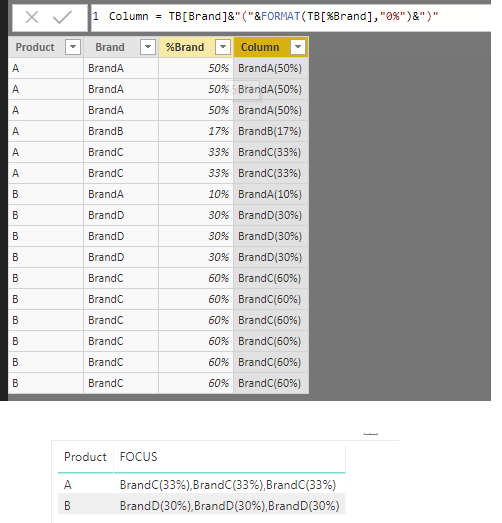
You may create the columns as below and then get the Focus measure.For example:
%Brand =
CALCULATE ( COUNT ( TB[Brand] ), ALLEXCEPT ( TB, TB[Product], TB[Brand] ) )
/ CALCULATE ( COUNT ( TB[Product] ), ALLEXCEPT ( TB, TB[Product] ) )
Column = TB[Brand]&"("&FORMAT(TB[%Brand],"0%")&")"
FOCUS = CONCATENATEX(DISTINCT(TB),MAX(TB[Column]),",")
Regards,
You may create the columns as below and then get the Focus measure.For example:
%Brand =
CALCULATE ( COUNT ( TB[Brand] ), ALLEXCEPT ( TB, TB[Product], TB[Brand] ) )
/ CALCULATE ( COUNT ( TB[Product] ), ALLEXCEPT ( TB, TB[Product] ) )
Column = TB[Brand]&"("&FORMAT(TB[%Brand],"0%")&")"
FOCUS = CONCATENATEX(DISTINCT(TB),MAX(TB[Column]),",")
Regards,
Thank you very much!!
try playing around with CONCATENATEX:
https://docs.microsoft.com/en-us/dax/concatenatex-function-dax
The Power BI Data Visualization World Championships is back! Get ahead of the game and start preparing now!
| User | Count |
|---|---|
| 61 | |
| 46 | |
| 40 | |
| 38 | |
| 22 |
| User | Count |
|---|---|
| 176 | |
| 131 | |
| 118 | |
| 82 | |
| 54 |