
Join us at FabCon Atlanta from March 16 - 20, 2026, for the ultimate Fabric, Power BI, AI and SQL community-led event. Save $200 with code FABCOMM.
Register now!Learn from the best! Meet the four finalists headed to the FINALS of the Power BI Dataviz World Championships! Register now
I have a question.
Suppose that i have a single date filter/slicer, and i have a line graph like above.
So if i choose 1-October-2017 on the filter, then the line graph will show data from Date 1-Oct-2017 till 31-Oct-2017.
Or if i choose 1-December-2016 on the filter, then the line graph will show data from Date 1-Dec-2016 till 31-Dec-2016.
How can i do that in power BI? should i manage the table relationship? or is there any other trick to do that?
Thanks in advance.
Solved! Go to Solution.
Hi @deckamaha,
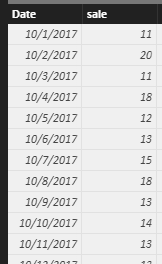
I try to reproduce your scenario using the sample table below.
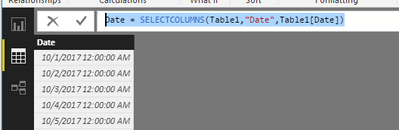
First, you need to create a new date table only have the date column using the formula by click "New Table" under Modeling on home page.
Date = SELECTCOLUMNS(Table1,"Date",Table1[Date])
Then create a measure using the formula.
Measure =
CALCULATE (
MAX ( Table1[sale] ),
FILTER ( Table1, Table1[Month] = MONTH ( SELECTEDVALUE ( 'Date'[Date] ) ) )
)
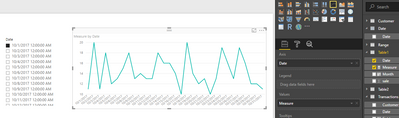
Finally, create a slicer including 'Date'[Date], a line chart including [Date] and measure. When you select 1-October-2017 on the slicer, the line graph will show data from Date 1-Oct-2017 till 31-Oct-2017 as follows.
Please respond to me if you have any other problems.
Best Regards,
Angelia
Hello, I did the same steps, I created two tables : table 1 (with the columns: date, sales, month and year) and table date.
I used the measure that you put, but it shows me a a single date filter/slicer' a single value in the graph' like above !! Thanks for your help
Hi @deckamaha,
I try to reproduce your scenario using the sample table below.
First, you need to create a new date table only have the date column using the formula by click "New Table" under Modeling on home page.
Date = SELECTCOLUMNS(Table1,"Date",Table1[Date])
Then create a measure using the formula.
Measure =
CALCULATE (
MAX ( Table1[sale] ),
FILTER ( Table1, Table1[Month] = MONTH ( SELECTEDVALUE ( 'Date'[Date] ) ) )
)
Finally, create a slicer including 'Date'[Date], a line chart including [Date] and measure. When you select 1-October-2017 on the slicer, the line graph will show data from Date 1-Oct-2017 till 31-Oct-2017 as follows.
Please respond to me if you have any other problems.
Best Regards,
Angelia
Share feedback directly with Fabric product managers, participate in targeted research studies and influence the Fabric roadmap.
Check out the February 2026 Power BI update to learn about new features.
| User | Count |
|---|---|
| 53 | |
| 51 | |
| 36 | |
| 15 | |
| 14 |
| User | Count |
|---|---|
| 93 | |
| 77 | |
| 41 | |
| 26 | |
| 26 |