
cancel
Showing results for 
Search instead for 
Did you mean: 

The Power BI Data Visualization World Championships is back! Get ahead of the game and start preparing now! Learn more

Reply
deckamaha
Frequent Visitor

Line graph show first date of the month till last date of the month by filter


Capture.JPG


I have a question.

Suppose that i have a single date filter/slicer, and i have a line graph like above.

So if i choose 1-October-2017 on the filter, then the line graph will show data from Date 1-Oct-2017 till 31-Oct-2017.

Or if i choose 1-December-2016 on the filter, then the line graph will show data from Date 1-Dec-2016 till 31-Dec-2016.


How can i do that in power BI? should i manage the table relationship? or is there any other trick to do that?


Thanks in advance.

1 ACCEPTED SOLUTION
v-huizhn-msft
Microsoft Employee
Microsoft Employee

Hi @deckamaha,

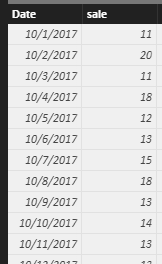
I try to reproduce your scenario using the sample table below.

1.PNG

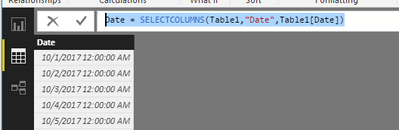
First, you need to create a new date table only have the date column using the formula by click "New Table" under Modeling on home page.

Date = SELECTCOLUMNS(Table1,"Date",Table1[Date])


2.PNG

Then create a measure using the formula.

Measure =
CALCULATE (
    MAX ( Table1[sale] ),
    FILTER ( Table1, Table1[Month] = MONTH ( SELECTEDVALUE ( 'Date'[Date] ) ) )
)


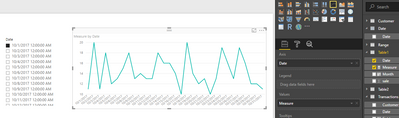
Finally, create a slicer including 'Date'[Date], a line chart including [Date] and measure. When you select 1-October-2017 on the slicer, the line graph will show data from Date 1-Oct-2017 till 31-Oct-2017 as follows.

3.PNG

Please respond to me if you have any other problems.

Best Regards,
Angelia

View solution in original post

2 REPLIES 2
Anonymous
Not applicable

Hello, I did the same steps, I created two tables : table 1 (with the columns: date, sales, month and year) and table date.
I used the measure that you put, but it shows me a a single date filter/slicer' a single value in the graph' like above !! Thanks for your help

bilo_0-1646843436442.png


v-huizhn-msft
Microsoft Employee
Microsoft Employee

Hi @deckamaha,

I try to reproduce your scenario using the sample table below.

1.PNG

First, you need to create a new date table only have the date column using the formula by click "New Table" under Modeling on home page.

Date = SELECTCOLUMNS(Table1,"Date",Table1[Date])


2.PNG

Then create a measure using the formula.

Measure =
CALCULATE (
    MAX ( Table1[sale] ),
    FILTER ( Table1, Table1[Month] = MONTH ( SELECTEDVALUE ( 'Date'[Date] ) ) )
)


Finally, create a slicer including 'Date'[Date], a line chart including [Date] and measure. When you select 1-October-2017 on the slicer, the line graph will show data from Date 1-Oct-2017 till 31-Oct-2017 as follows.

3.PNG

Please respond to me if you have any other problems.

Best Regards,
Angelia

Helpful resources

Announcements
Power BI DataViz World Championships

Power BI Dataviz World Championships

The Power BI Data Visualization World Championships is back! Get ahead of the game and start preparing now!

December 2025 Power BI Update Carousel

Power BI Monthly Update - December 2025

Check out the December 2025 Power BI Holiday Recap!

FabCon Atlanta 2026 carousel

FabCon Atlanta 2026

Join us at FabCon Atlanta, March 16-20, for the ultimate Fabric, Power BI, AI and SQL community-led event. Save $200 with code FABCOMM.