- Power BI forums
- Get Help with Power BI
- Desktop
- Service
- Report Server
- Power Query
- Mobile Apps
- Developer
- DAX Commands and Tips
- Custom Visuals Development Discussion
- Health and Life Sciences
- Power BI Spanish forums
- Translated Spanish Desktop
- Training and Consulting
- Instructor Led Training
- Dashboard in a Day for Women, by Women
- Galleries
- Data Stories Gallery
- Themes Gallery
- Contests Gallery
- QuickViz Gallery
- Quick Measures Gallery
- Visual Calculations Gallery
- Notebook Gallery
- Translytical Task Flow Gallery
- TMDL Gallery
- R Script Showcase
- Webinars and Video Gallery
- Ideas
- Custom Visuals Ideas (read-only)
- Issues
- Issues
- Events
- Upcoming Events
Learn from the best! Meet the four finalists headed to the FINALS of the Power BI Dataviz World Championships! Register now
- Power BI forums
- Forums
- Get Help with Power BI
- Desktop
- Re: Line graph question
- Subscribe to RSS Feed
- Mark Topic as New
- Mark Topic as Read
- Float this Topic for Current User
- Bookmark
- Subscribe
- Printer Friendly Page


- Mark as New
- Bookmark
- Subscribe
- Mute
- Subscribe to RSS Feed
- Permalink
- Report Inappropriate Content
Line graph question
Goodmorning guys, i need your help with a simple question
I want a line graph that displays the cumulative value of a certain value
We register on a daily basis the number of new contracts that are entered and i want that do be displayed in a line graph.
So far so good but that line is based on a value per day instead of a cumulativ line
What i need is a cumulative line per week that grows.
wk 1 200
wk 2 150
wk 3 160
wk 4 220
But my line should show these values
wk 1 200
wk 2 350 (200+150)
wk 3 510 (200+150+160)
wk 4 730 (200+150+160+220)
So basically i need a measure that sums the values based on a week and at the previouos week(s)
Solved! Go to Solution.


- Mark as New
- Bookmark
- Subscribe
- Mute
- Subscribe to RSS Feed
- Permalink
- Report Inappropriate Content
Hi, @RonaldvdH
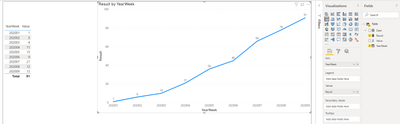
Based on your description, I created data to reproduce your scenario. The pbix file is attached in the end.

You may create a measure as below.
Result =
CALCULATE(
    SUM('Table'[Value]),
    FILTER(
        ALL('Table'),
        [YearWeek]<=MAX('Table'[YearWeek])
    )
)
Result:
Best Regards
Allan
If this post helps, then please consider Accept it as the solution to help the other members find it more quickly.
- Mark as New
- Bookmark
- Subscribe
- Mute
- Subscribe to RSS Feed
- Permalink
- Report Inappropriate Content
i had a date table in my report (totally forgot about it) and now it works based on your help
- Mark as New
- Bookmark
- Subscribe
- Mute
- Subscribe to RSS Feed
- Permalink
- Report Inappropriate Content
@v-alq-msft I was to quick in my response because i used your pbix file but how did you calculate the value ? it looks like you used a tifferent measure to calculate the total amount of dates in a given week right ?
- Mark as New
- Bookmark
- Subscribe
- Mute
- Subscribe to RSS Feed
- Permalink
- Report Inappropriate Content
Hi, @RonaldvdH
Based on your description, I created data to reproduce your scenario. The pbix file is attached in the end.
You may create a measure as below.
Result =
CALCULATE(
    SUM('Table'[Value]),
    FILTER(
        ALL('Table'),
        [YearWeek]<=MAX('Table'[YearWeek])
    )
)
Result:
Best Regards
Allan
If this post helps, then please consider Accept it as the solution to help the other members find it more quickly.
- Mark as New
- Bookmark
- Subscribe
- Mute
- Subscribe to RSS Feed
- Permalink
- Report Inappropriate Content
What i did is the following, i have a table with adressen and a date.
I use a formula to calculate the date into a week by using this formula
if [actief aangemeld] = null then ""
else
Text.From(Date.Year([actief aangemeld])) & "-" & Text.PadStart(Text.From(Date.WeekOfYear([actief aangemeld])), 2, "0")
And then the formula doesn't work because it's a string but i always use the format YYYY-WW


- Mark as New
- Bookmark
- Subscribe
- Mute
- Subscribe to RSS Feed
- Permalink
- Report Inappropriate Content
Hi,
have you tried adding a Quick Measure - Running total? Usually it works fine.
Or you can create a measure on your own as well:
calculate( SUM( YourColumn ), Filter (all ( YourTable[DateColumn] ), YourTable[DateColumn] <= MAX(YourTable[DateColumn]) )
Or you can do the same in Power Query:
https://www.youtube.com/watch?v=uX3_dnb5on0
- Mark as New
- Bookmark
- Subscribe
- Mute
- Subscribe to RSS Feed
- Permalink
- Report Inappropriate Content
Your formula doesn't seem to work because i used a formula to convert my date to a week using this formula in the advanced editor:
if [actief aangemeld] = null then ""
else
Text.From(Date.Year([actief aangemeld])) & "-" & Text.PadStart(Text.From(Date.WeekOfYear([actief aangemeld])), 2, "0")
The result is a string and therefor it doesn't work i think


- Mark as New
- Bookmark
- Subscribe
- Mute
- Subscribe to RSS Feed
- Permalink
- Report Inappropriate Content
@RonaldvdH , if you are using a date table and week is part of that then it will give cumulative with dates
example
Cumm Sales = CALCULATE(SUM(Table[value]),filter(allselected(Date),Date[Date] <=max(Date[Date])))
or
Cumm Sales = CALCULATE(SUM(Table[value]),filter(allselected(Table),Table[Date] <=max(Table[Date])))
else create a week rank in table and use that
Week Rank = RANKX(all('Date'),'Date'[Year Week],,ASC,Dense) //YYYYMM format
Cumm Sales = CALCULATE(SUM(Table[value]),filter(allselected(Date),Date[Week Rank] <=max(Date[Week Rank])))
- Mark as New
- Bookmark
- Subscribe
- Mute
- Subscribe to RSS Feed
- Permalink
- Report Inappropriate Content
I dont have a date table so is there an option to work with the data i do have ?
I have a table with dates in them and i use a formula to convert (to a string) the dates into a week number format YYYY-MM

Helpful resources

New to Fabric Survey
If you have recently started exploring Fabric, we'd love to hear how it's going. Your feedback can help with product improvements.

Power BI DataViz World Championships - June 2026
A new Power BI DataViz World Championship is coming this June! Don't miss out on submitting your entry.

Join our Fabric User Panel
Share feedback directly with Fabric product managers, participate in targeted research studies and influence the Fabric roadmap.

Power BI Community Update - March 2026
Check out the March 2026 Power BI update to learn about new features.

| User | Count |
|---|---|
| 57 | |
| 38 | |
| 33 | |
| 19 | |
| 16 |


| User | Count |
|---|---|
| 69 | |
| 66 | |
| 41 | |
| 32 | |
| 25 |


