Don't miss your chance to take the Fabric Data Engineer (DP-600) exam for FREE! Find out how by watching the DP-600 session on-demand now through April 28th.
Learn moreJoin the FabCon + SQLCon recap series. Up next: Power BI, Real-Time Intelligence, IQ and AI, and Data Factory take center stage. All sessions are available on-demand after the live show. Register now
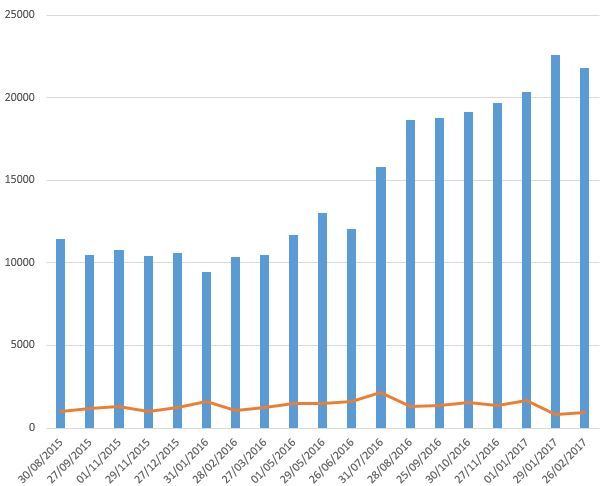
I am experiencing problem displaying the line graph in power bi but not experiencing the same problem in Excel when the data is the same. The line is over the bar in Power BI but its not the same in Excel. Any ideas on the solution for this in Power BI?
Incorrect line
Correct line
Solved! Go to Solution.
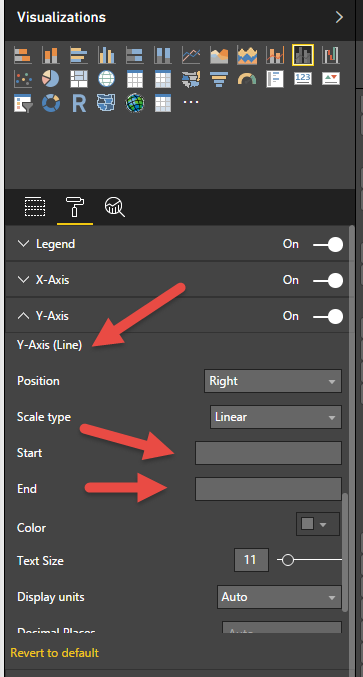
Or could it be that the scale of the Y Axis on the Power BI Chart is set to auto for top and bottom. Have a play with different values in the Start/End and see what happens 🙂
Based on the labels to the right compared to those on the left, it appears that the secondary axis is enabled. In the Format pane, expand Y Axis and find the option for "Show secondary". Turn it Off.
Or could it be that the scale of the Y Axis on the Power BI Chart is set to auto for top and bottom. Have a play with different values in the Start/End and see what happens 🙂
Check out the April 2026 Power BI update to learn about new features.
If you have recently started exploring Fabric, we'd love to hear how it's going. Your feedback can help with product improvements.
A new Power BI DataViz World Championship is coming this June! Don't miss out on submitting your entry.
| User | Count |
|---|---|
| 43 | |
| 38 | |
| 35 | |
| 21 | |
| 15 |
| User | Count |
|---|---|
| 65 | |
| 58 | |
| 28 | |
| 27 | |
| 25 |