Join us at FabCon Atlanta from March 16 - 20, 2026, for the ultimate Fabric, Power BI, AI and SQL community-led event. Save $200 with code FABCOMM.
Register now!The Power BI Data Visualization World Championships is back! Get ahead of the game and start preparing now! Learn more
I don't know if i'm missing something or this is just a bug that is keeping me from getting the desired result so here i am asking for some help.
Here are the steps:
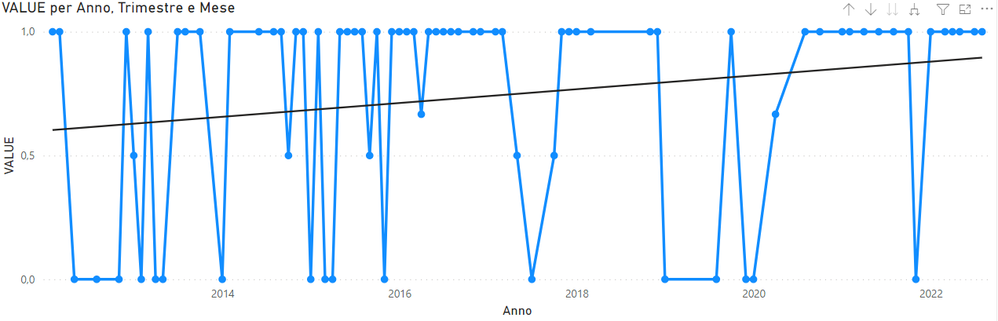
1- I've created a line chart to display "value" (a measure) over time (august is the latest value point):
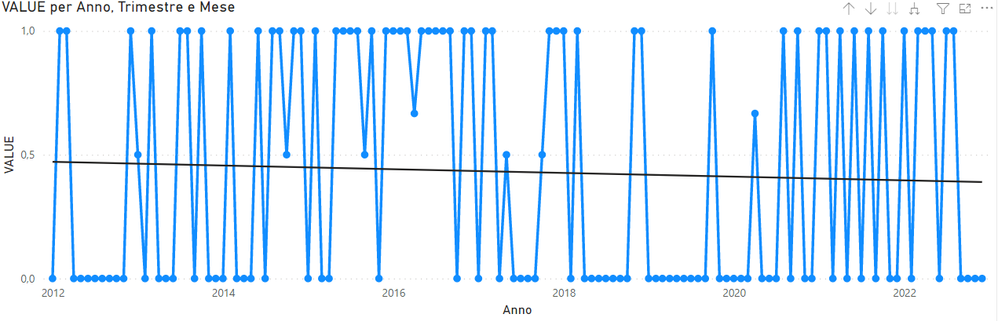
2- Of coure Power BI doesn't show 0 values so i've added "+ 0" to "value" measure. By doing this it also extend the timeframe (no idea why) showing months up to december:
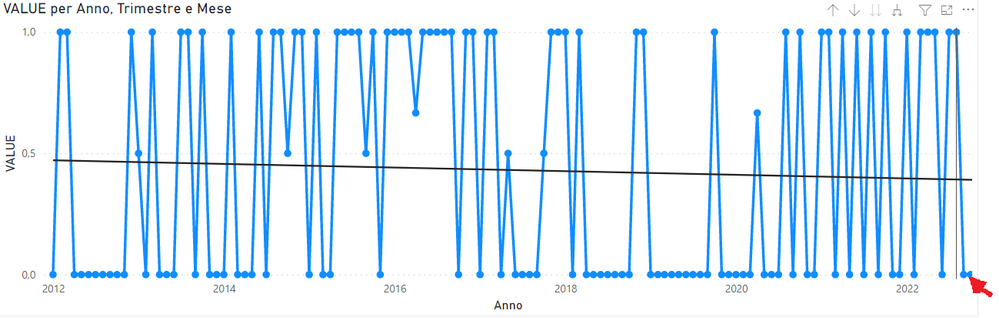
3 - To avoid this problem i've selected a custom X axis end (31 august):
The problem is that september and october are still visible but can't be selected (f.e. is i place the cursor where the red arrow is august is highligted). This leads to a confusing result.
Filtering the data don't affect the x axis scale, only the displayed data.
I hope i've been clear and thank in advance for you help!
Hi @babajat
Thanks for reaching out to us.
>>This leads to a confusing result.
can you provide Expected Result and Actual Result ? or you can share a .pbix file, then we will check it. thanks
Best Regards,
Community Support Team _Tang
If this post helps, please consider Accept it as the solution to help the other members find it more quickly.
Hi! is there any news on this topic?
The Power BI Data Visualization World Championships is back! Get ahead of the game and start preparing now!
| User | Count |
|---|---|
| 39 | |
| 37 | |
| 33 | |
| 32 | |
| 29 |
| User | Count |
|---|---|
| 133 | |
| 88 | |
| 85 | |
| 68 | |
| 64 |