Learn from the best! Meet the four finalists headed to the FINALS of the Power BI Dataviz World Championships! Register now
I don't know if i'm missing something or this is just a bug that is keeping me from getting the desired result so here i am asking for some help.
Here are the steps:
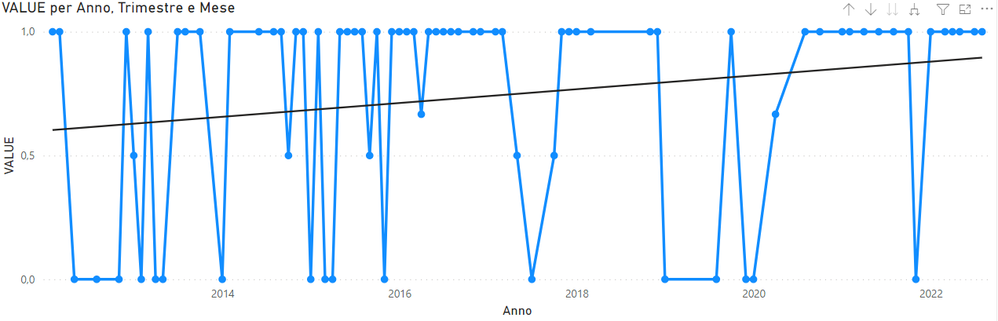
1- I've created a line chart to display "value" (a measure) over time (august is the latest value point):
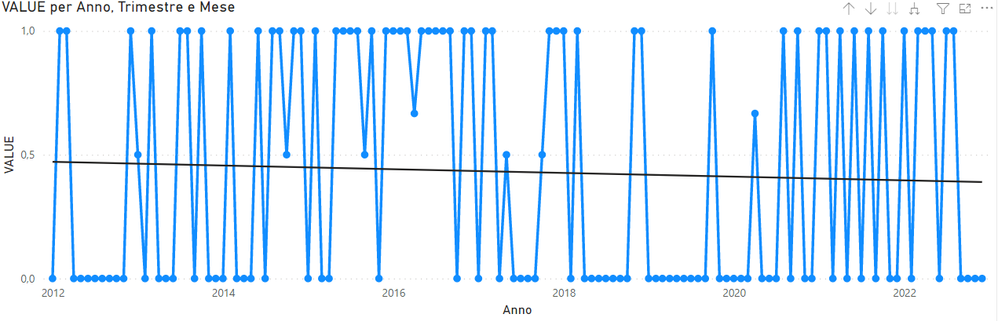
2- Of coure Power BI doesn't show 0 values so i've added "+ 0" to "value" measure. By doing this it also extend the timeframe (no idea why) showing months up to december:
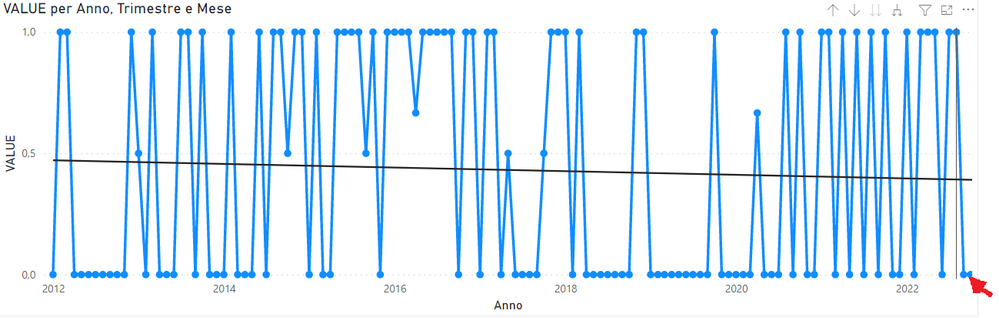
3 - To avoid this problem i've selected a custom X axis end (31 august):
The problem is that september and october are still visible but can't be selected (f.e. is i place the cursor where the red arrow is august is highligted). This leads to a confusing result.
Filtering the data don't affect the x axis scale, only the displayed data.
I hope i've been clear and thank in advance for you help!
Hi @babajat
Thanks for reaching out to us.
>>This leads to a confusing result.
can you provide Expected Result and Actual Result ? or you can share a .pbix file, then we will check it. thanks
Best Regards,
Community Support Team _Tang
If this post helps, please consider Accept it as the solution to help the other members find it more quickly.
Hi! is there any news on this topic?
| User | Count |
|---|---|
| 56 | |
| 42 | |
| 30 | |
| 18 | |
| 16 |
| User | Count |
|---|---|
| 70 | |
| 58 | |
| 38 | |
| 22 | |
| 22 |