Get certified for free when you join Fabric Data Days 2026 and dive into Fabric, Power BI, SQL, AI, and other essential data skills.
Join nowJuly 7 - July 17 | Round 2 of the Power BI Dataviz World Championships. Don't miss your chance! Learn more
Hello,
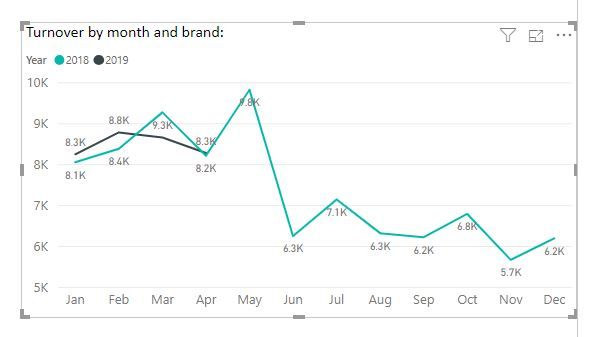
Tha chart attached is showing year vs month for 1 brand, any idea how I can create a line chart showing 3 brands wih year and monthly performace.
Thanks,
Steve
Solved! Go to Solution.
Hi @brinky
Another method is to import a custom visual Power KPI from marketplace.
Create measures
2018 = CALCULATE(SUM(Table1[data]),FILTER(Table1,Table1[year]=2018)) 2019 = CALCULATE(SUM(Table1[data]),FILTER(Table1,Table1[year]=2019))
Under Format->line, select each brand name, apply color for it.
Best Regards
Maggie
Community Support Team _ Maggie Li
If this post helps, then please consider Accept it as the solution to help the other members find it more quickly.
Hi @brinky
Another method is to import a custom visual Power KPI from marketplace.
Create measures
2018 = CALCULATE(SUM(Table1[data]),FILTER(Table1,Table1[year]=2018)) 2019 = CALCULATE(SUM(Table1[data]),FILTER(Table1,Table1[year]=2019))
Under Format->line, select each brand name, apply color for it.
Best Regards
Maggie
Community Support Team _ Maggie Li
If this post helps, then please consider Accept it as the solution to help the other members find it more quickly.
Hi @brinky
I have this kind of table structure, when adding "brand" column in a slicer, i can show 3 brands wih year and monthly performace.
Is this something as expected?
Best Regards
Maggie
Community Support Team _ Maggie Li
If this post helps, then please consider Accept it as the solution to help the other members find it more quickly.
Join us in Barcelona for FabCon and SQLCon, the Fabric, Power BI, SQL, and AI community event. Save €200 with code FABCMTY200.
Join Fabric Data Days 2026: 60 days of free live/on-demand sessions, challenges, study groups, and certification opportunities.
| User | Count |
|---|---|
| 23 | |
| 22 | |
| 18 | |
| 17 | |
| 13 |
| User | Count |
|---|---|
| 63 | |
| 44 | |
| 42 | |
| 40 | |
| 39 |