cancel
Showing results for 
Search instead for 
Did you mean: 

Did you hear? There's a new SQL AI Developer certification (DP-800). Start preparing now and be one of the first to get certified. Register now

Reply
ashamsuzzoha
Advocate II
Advocate II

Line chart without aggregate values

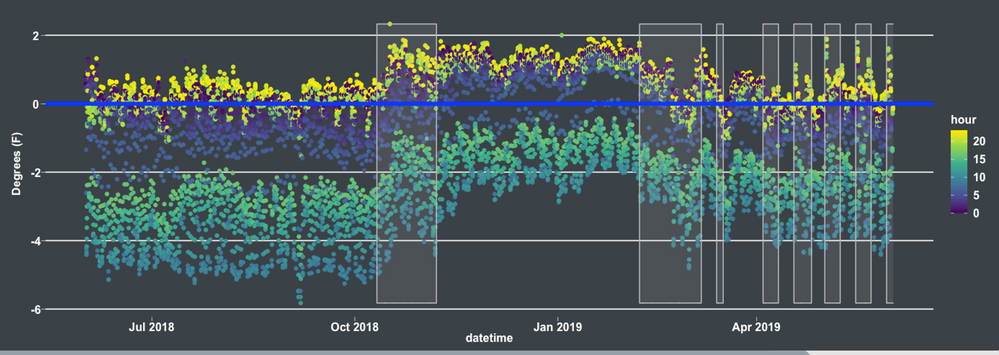
Is there not a way to disaggregate value data on a line chart? I want to plot hourly data on a daily line chart like the chart below. So each day will have 24 plots. But I cannot use a "Do not aggregrate" option for the values, only an aggegration like "average". That would be fine if I wanted the daily average for the value but I want all the values for a single day plotted for that day. I don't want to zoom either to the hour level on the x-axis either.Screenshot 2021-01-21 145759.png


So far the only solution I think of is to create measure to calculate the average for each hour. e.g


AvgHourly_Hour4 =
CALCULATE(
AVERAGE('Data'[Value]),
'Date'[Hour] = 4
)


(so 24 measures in total) and plotting them as series on the line chart.


1 ACCEPTED SOLUTION
Anonymous
Not applicable

Hi @ashamsuzzoha ,


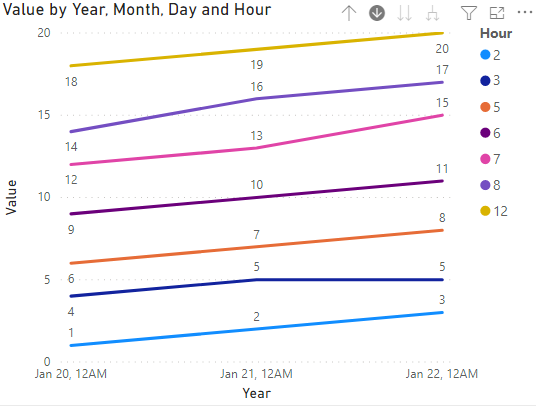
You could apply Hour to Legend pane.


1.26.2.1.PNG


Refer to these for further help.

https://community.powerbi.com/t5/Desktop/Do-not-sum-line-chart-Values/m-p/794565

https://community.powerbi.com/t5/Desktop/How-to-show-value-instead-of-aggregate/m-p/122327


Best Regards,
Eyelyn Qin
If this post helps, then please consider Accept it as the solution to help the other members find it more quickly.

View solution in original post

3 REPLIES 3
Anonymous
Not applicable

Hi @ashamsuzzoha ,


You could apply Hour to Legend pane.


1.26.2.1.PNG


Refer to these for further help.

https://community.powerbi.com/t5/Desktop/Do-not-sum-line-chart-Values/m-p/794565

https://community.powerbi.com/t5/Desktop/How-to-show-value-instead-of-aggregate/m-p/122327


Best Regards,
Eyelyn Qin
If this post helps, then please consider Accept it as the solution to help the other members find it more quickly.

Oh, that's exactly what I was looking for! Can't believe I overlooked that.


Thanks!

lbendlin
Super User
Super User

that, or use calculation groups.  This really is a multi party conflict between your valid business reason, the rendering's engine enforced limits, and the screen resolution.  You cannot technically see all your data points, so mindful aggregation will not make the user experience worse.

Helpful resources

Announcements
April Power BI Update Carousel

Power BI Monthly Update - April 2026

Check out the April 2026 Power BI update to learn about new features.

Fabric SQL PBI Data Days

Data Days 2026 coming soon!

Sign up to receive a private message when registration opens and key events begin.

New to Fabric survey Carousel

New to Fabric Survey

If you have recently started exploring Fabric, we'd love to hear how it's going. Your feedback can help with product improvements.

Power BI DataViz World Championships carousel

Power BI DataViz World Championships - June 2026

A new Power BI DataViz World Championship is coming this June! Don't miss out on submitting your entry.