cancel
Showing results for 
Search instead for 
Did you mean: 

Get Fabric certified for FREE! Don't miss your chance! Learn more

Reply
kylemaslak
Regular Visitor

Line chart help (forecasting)

Hi,


I am looking to try and add forecasting to my dataset if possible.

I tried adding a date table but received an error that my data isn't evenly spaced.


Any help would be greatly appriciated


Here is a link to my pbix file https://www.dropbox.com/s/d8xgudgl7ylb4c8/test.pbix?dl=0


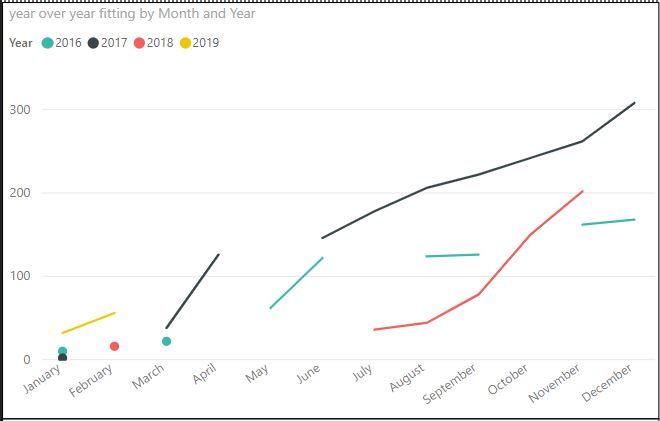
Another issue I have is on my cumulative line charts. If there is a month with no sales of a product the line for that year does not remain flat, it just disappears. Any reccomendations on how to fix this would be awesome.


cumulative line chart.JPG

1 ACCEPTED SOLUTION

Hi @kylemaslak 

You may create a table as a calendar table.Then create the measures.Please check Page2 in attached file.

year over year fitting =
CALCULATE (
    SUM ( Test[Fitting Qty] ),
    FILTER (
        ALLSELECTED ( 'Table' ),
        AND (
            'Table'[Date] <= MAX ( 'Table'[Date] ),
            YEAR ( 'Table'[Date] ) = YEAR ( MAX ( 'Table'[Date] ) )
        )
    )
)

Regards,

Cherie


Community Support Team _ Cherie Chen
If this post helps, then please consider Accept it as the solution to help the other members find it more quickly.

View solution in original post

2 REPLIES 2
HotChilli
Community Champion
Community Champion

You could use the old "+ 0" trick for your measure to generate a 0 when there is no data

Hi @kylemaslak 

You may create a table as a calendar table.Then create the measures.Please check Page2 in attached file.

year over year fitting =
CALCULATE (
    SUM ( Test[Fitting Qty] ),
    FILTER (
        ALLSELECTED ( 'Table' ),
        AND (
            'Table'[Date] <= MAX ( 'Table'[Date] ),
            YEAR ( 'Table'[Date] ) = YEAR ( MAX ( 'Table'[Date] ) )
        )
    )
)

Regards,

Cherie


Community Support Team _ Cherie Chen
If this post helps, then please consider Accept it as the solution to help the other members find it more quickly.

Helpful resources

Announcements
Sticker Challenge 2026 Carousel

Join our Community Sticker Challenge 2026

If you love stickers, then you will definitely want to check out our Community Sticker Challenge!

January Power BI Update Carousel

Power BI Monthly Update - January 2026

Check out the January 2026 Power BI update to learn about new features.

FabCon Atlanta 2026 carousel

FabCon Atlanta 2026

Join us at FabCon Atlanta, March 16-20, for the ultimate Fabric, Power BI, AI and SQL community-led event. Save $200 with code FABCOMM.