Learn from the best! Meet the four finalists headed to the FINALS of the Power BI Dataviz World Championships! Register now
Hi,
I am looking to try and add forecasting to my dataset if possible.
I tried adding a date table but received an error that my data isn't evenly spaced.
Any help would be greatly appriciated
Here is a link to my pbix file https://www.dropbox.com/s/d8xgudgl7ylb4c8/test.pbix?dl=0
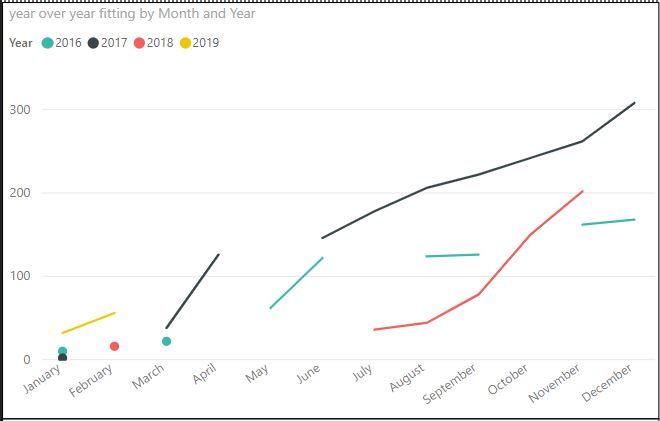
Another issue I have is on my cumulative line charts. If there is a month with no sales of a product the line for that year does not remain flat, it just disappears. Any reccomendations on how to fix this would be awesome.
Solved! Go to Solution.
Hi @kylemaslak
You may create a table as a calendar table.Then create the measures.Please check Page2 in attached file.
year over year fitting =
CALCULATE (
SUM ( Test[Fitting Qty] ),
FILTER (
ALLSELECTED ( 'Table' ),
AND (
'Table'[Date] <= MAX ( 'Table'[Date] ),
YEAR ( 'Table'[Date] ) = YEAR ( MAX ( 'Table'[Date] ) )
)
)
)
Regards,
Cherie
You could use the old "+ 0" trick for your measure to generate a 0 when there is no data
Hi @kylemaslak
You may create a table as a calendar table.Then create the measures.Please check Page2 in attached file.
year over year fitting =
CALCULATE (
SUM ( Test[Fitting Qty] ),
FILTER (
ALLSELECTED ( 'Table' ),
AND (
'Table'[Date] <= MAX ( 'Table'[Date] ),
YEAR ( 'Table'[Date] ) = YEAR ( MAX ( 'Table'[Date] ) )
)
)
)
Regards,
Cherie
| User | Count |
|---|---|
| 56 | |
| 42 | |
| 30 | |
| 18 | |
| 16 |
| User | Count |
|---|---|
| 71 | |
| 59 | |
| 39 | |
| 22 | |
| 22 |