We've captured the moments from FabCon & SQLCon that everyone is talking about, and we are bringing them to the community, live and on-demand. Starts on April 14th. Register now
Hello!
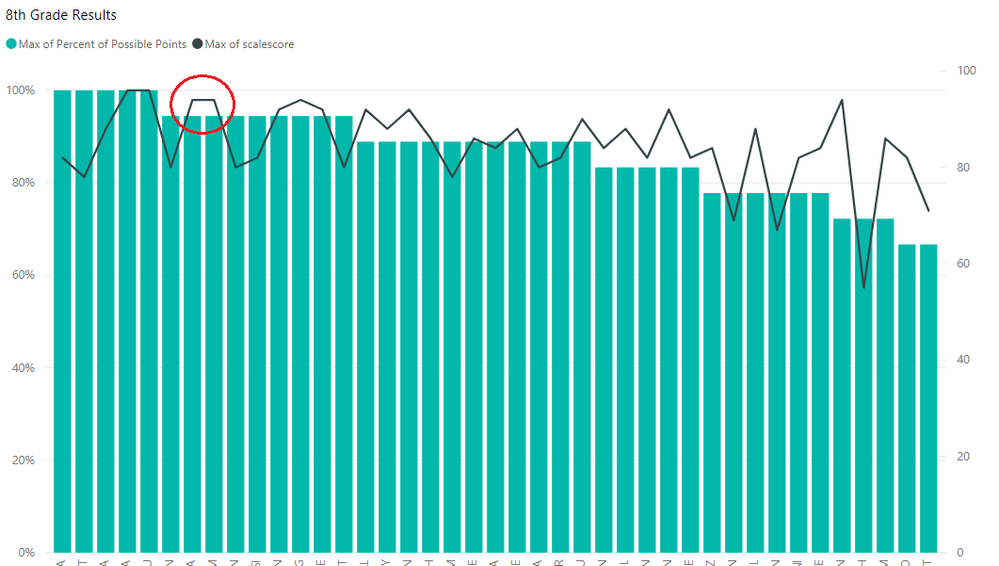
I have a line and stacked column chart right now. Ideally the columns are most recent test grades, and the line values are the previous test grades. The align zero setting is selected, but there's some issues still with the visual:
The values still aren't properly aligned. For example, the circled values are both 94/94.4 but there's a large gap between the column and the line. Thanks in advance for any help to fix this issue!
Any chance you can post sample data/PBIX that demonstrates this problem, difficult to recreate otherwise. Please see this post regarding How to Get Your Question Answered Quickly: https://community.powerbi.com/t5/Community-Blog/How-to-Get-Your-Question-Answered-Quickly/ba-p/38490
I've figured it out, thank you!
Hi @Lorraine,
Glad to hear that you have resolved it by yourself. Would you please kindly share your solution so that it can benefit more community members?
Thanks,
Yuliana Gu
If you have recently started exploring Fabric, we'd love to hear how it's going. Your feedback can help with product improvements.
A new Power BI DataViz World Championship is coming this June! Don't miss out on submitting your entry.
Share feedback directly with Fabric product managers, participate in targeted research studies and influence the Fabric roadmap.
| User | Count |
|---|---|
| 53 | |
| 38 | |
| 33 | |
| 17 | |
| 17 |
| User | Count |
|---|---|
| 67 | |
| 62 | |
| 38 | |
| 34 | |
| 22 |