cancel
Showing results for 
Search instead for 
Did you mean: 

View all the Fabric Data Days sessions on demand. View schedule

Reply
JorgeAbiad
Helper III
Helper III

Line and Clustered Column Chart cannot display the full year range in the X-axis

Hello PBI experts,


Good day!!

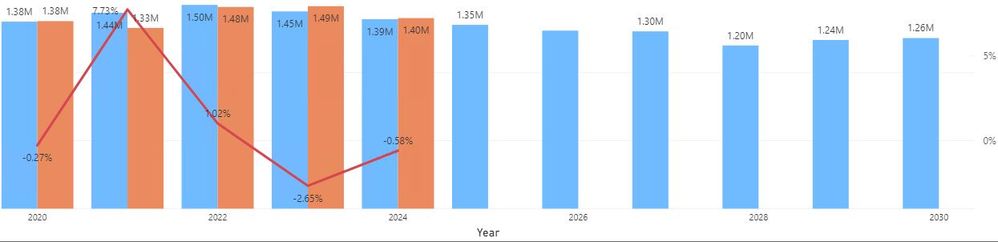
I have created a visualization using Line and Clustered Column chart. In the X-axis I plotted the Year value. The values in the X-axis is can be changed by using a Slicer visual. In the Slicer visual, the range is from 2020-2036. Currently, we only have data until 2030, However, if I would select the yea from 2020 up to 2030, only 2020,2022,2024,2026,2028,2030 are shown in the X-axis. The data for 2021,2023,2025,2027 and 2029 are shown but the years are not shown in the X-axis. Basically, I have here 11 years of data. I noticed that when the values in the X-axis exceed 10, the values in the X-axis is being cropped out. Is this standard behavior of this visual? Is there a possible way to display all 11 year values, considering that it will be expanded when we enter our data for 2031 - 2036?

Thank you!

Missing Year valuesMissing Year values

2 ACCEPTED SOLUTIONS
MFelix
Super User
Super User

Hi @JorgeAbiad ,


Looking at you image appears to me that the axis is on continuos format check the x-axis format and try changing it to categorical instead of continuous.


Regards

Miguel Félix


Did I answer your question? Mark my post as a solution!

Proud to be a Super User!

Check out my blog: Power BI em Português


View solution in original post

Pragati11
Super User
Super User

Hi @JorgeAbiad ,


Change your X-axis in format pane from Continuous scale type to Categorical scale type.


Thanks.

Best Regards,

Pragati Jain


MVP logo


LinkedIn | Twitter | Blog YouTube 

Did I answer your question? Mark my post as a solution! This will help others on the forum!

Appreciate your Kudos!!

Proud to be a Super User!!

View solution in original post

4 REPLIES 4
Pragati11
Super User
Super User

Hi @JorgeAbiad ,


Change your X-axis in format pane from Continuous scale type to Categorical scale type.


Thanks.

Best Regards,

Pragati Jain


MVP logo


LinkedIn | Twitter | Blog YouTube 

Did I answer your question? Mark my post as a solution! This will help others on the forum!

Appreciate your Kudos!!

Proud to be a Super User!!

Hello @Pragati11 ,


Thank you!! After applying ascending sort, I got what I want to achieved.


Regards,

JorgeAbiad

MFelix
Super User
Super User

Hi @JorgeAbiad ,


Looking at you image appears to me that the axis is on continuos format check the x-axis format and try changing it to categorical instead of continuous.


Regards

Miguel Félix


Did I answer your question? Mark my post as a solution!

Proud to be a Super User!

Check out my blog: Power BI em Português


Hello @MFelix ,


Thank you very much! This is just what I need.


Regards,

JorgeAbiad

Helpful resources

Announcements
November Power BI Update Carousel

Power BI Monthly Update - November 2025

Check out the November 2025 Power BI update to learn about new features.

Fabric Data Days Carousel

Fabric Data Days

Advance your Data & AI career with 50 days of live learning, contests, hands-on challenges, study groups & certifications and more!

FabCon Atlanta 2026 carousel

FabCon Atlanta 2026

Join us at FabCon Atlanta, March 16-20, for the ultimate Fabric, Power BI, AI and SQL community-led event. Save $200 with code FABCOMM.

Top Solution Authors
Top Kudoed Authors