cancel
Showing results for 
Search instead for 
Did you mean: 

Data Days is here! Join us now for 60+ days of learning, challenges, and connection. Learn more

Reply
dhuangx5
Frequent Visitor

Line Graph data point not connecting

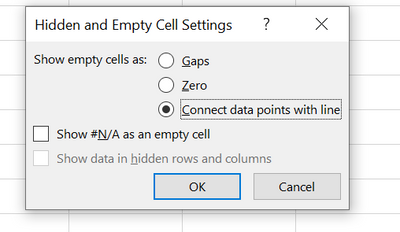
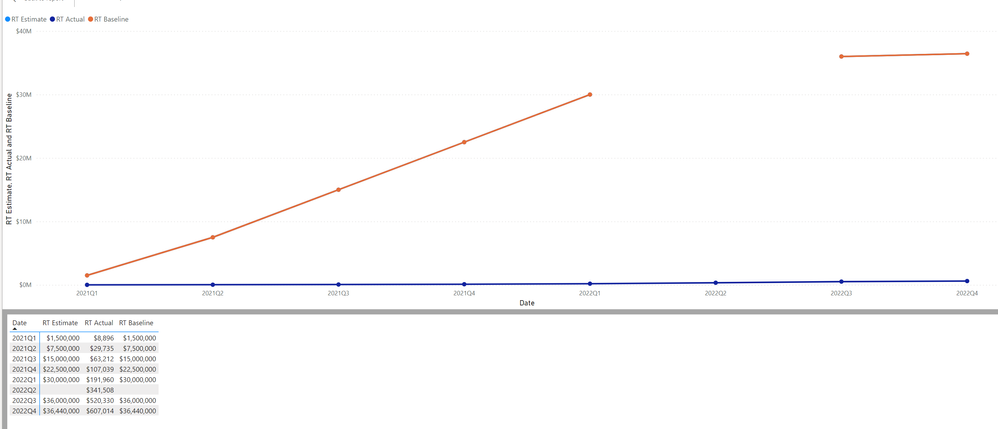
Hi, I'm trying to have the orange lind connect. But there seem to be a gap. In excel the work around is to use Connect data points with line, but I can't find that function in powerBI.

dhuangx5_1-1654616032860.png


dhuangx5_0-1654615945899.png


1 ACCEPTED SOLUTION
v-yalanwu-msft
Community Support
Community Support

Hi, @dhuangx5 ;

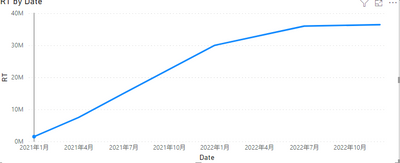
Your X-axis is Date type or text, if it is date format,you could select continous.

vyalanwumsft_0-1654841066254.png

The final output is shown below:

vyalanwumsft_1-1654841084104.png

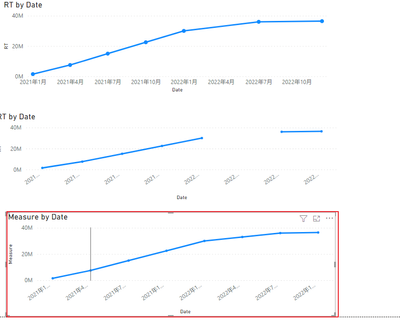
If it not date format. you could add another measure.

Measure = IF([RT]=BLANK(),CALCULATE(AVERAGE('Table (2)'[value]),FILTER(ALLSELECTED('Table (2)'),DATEDIFF([Date],MAX('Table (2)'[Date]),QUARTER) in {-1,1})),[RT])

The final output is shown below:

vyalanwumsft_2-1654841259201.png


Best Regards,
Community Support Team _ Yalan Wu
If this post helps, then please consider Accept it as the solution to help the other members find it more quickly.

View solution in original post

3 REPLIES 3
v-yalanwu-msft
Community Support
Community Support

Hi, @dhuangx5 ;

Your X-axis is Date type or text, if it is date format,you could select continous.

vyalanwumsft_0-1654841066254.png

The final output is shown below:

vyalanwumsft_1-1654841084104.png

If it not date format. you could add another measure.

Measure = IF([RT]=BLANK(),CALCULATE(AVERAGE('Table (2)'[value]),FILTER(ALLSELECTED('Table (2)'),DATEDIFF([Date],MAX('Table (2)'[Date]),QUARTER) in {-1,1})),[RT])

The final output is shown below:

vyalanwumsft_2-1654841259201.png


Best Regards,
Community Support Team _ Yalan Wu
If this post helps, then please consider Accept it as the solution to help the other members find it more quickly.

Hi, Thank you for the great solution. My problem is slightly different from this problem. Instead of having missing value on [Value] column I have another column Check which has TRUE/FALSE data. And I have measure which calculation is like this 

Measure = CALCULATE(COUNTROWS('Table'),'Table'[Check]=TRUE())/COUNTROWS('Table')

I have calendar table which has been conected with the date and data is being presented in a weekly manner which means I cannot use continious instead of categorical in X-axis settings. Now, if there is no value which is true within a week I get null value not that my column[Value] is blank but my measure is blank.

Can you help me with the solution or any thoughts would be greatly appriciated. 

dhuangx5
Frequent Visitor

Here is the measure I used.


CALCULATE(sum([Actual]),

FILTER(ALLSELECTED('Calendar'[Date]),

ISONORAFTER('Calendar'[Date], Max(Actual[Date]), DESC)))

Helpful resources

Announcements
Fabric Data Days is here Carousel

Fabric Data Days 2026

Don't miss out on Data Days, June 15 through August 7. Learn Fabric, Power BI, SQL, AI and more.

May Power BI Update Carousel

Power BI Monthly Update - May 2026

Check out the May 2026 Power BI update to learn about new features.

Power BI DataViz World Championships carousel

Power BI DataViz World Championships - June 2026

A new Power BI DataViz World Championship is coming this June! Don't miss out on submitting your entry.