
Join us at FabCon Atlanta from March 16 - 20, 2026, for the ultimate Fabric, Power BI, AI and SQL community-led event. Save $200 with code FABCOMM.
Register now!Vote for your favorite vizzies from the Power BI Dataviz World Championship submissions. Vote now!
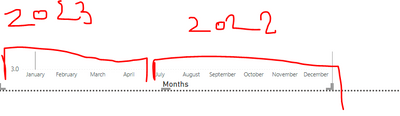
I have the table where my data column looks like this but my visual is showing data ordered by months (January comes before December) I would like the first data point to be the oldest one. So x-axis should start with July 2022, and August 2022........March 2023 and April 2023. Can this be accoplished?
Solved! Go to Solution.
@stribor45 , better use year of axis and expand and switch off concatenate label -off
Or sort your month on this column
month = if(month([Date]) <7, month([Date])+6 , month([Date])-6)
How to Create Sort Column and Solve Related Errors:
https://www.youtube.com/watch?v=KK1zu4MBb-c
Reformating the date to MMMM YYYYY and changing the axis type to "Categorical" resolved it for me.
Thank u for help!
Reformating the date to MMMM YYYYY and changing the axis type to "Categorical" resolved it for me.
@stribor45 , better use year of axis and expand and switch off concatenate label -off
Or sort your month on this column
month = if(month([Date]) <7, month([Date])+6 , month([Date])-6)
How to Create Sort Column and Solve Related Errors:
https://www.youtube.com/watch?v=KK1zu4MBb-c
Vote for your favorite vizzies from the Power BI World Championship submissions!
If you love stickers, then you will definitely want to check out our Community Sticker Challenge!
Check out the January 2026 Power BI update to learn about new features.
| User | Count |
|---|---|
| 64 | |
| 56 | |
| 43 | |
| 20 | |
| 17 |
| User | Count |
|---|---|
| 123 | |
| 108 | |
| 44 | |
| 32 | |
| 26 |