
Don't miss your chance to take the Fabric Data Engineer (DP-600) exam for FREE! Find out how by attending the DP-600 session on April 23rd (pacific time), live or on-demand.
Learn moreNext up in the FabCon + SQLCon recap series: The roadmap for Microsoft SQL and Maximizing Developer experiences in Fabric. All sessions are available on-demand after the live show. Register now
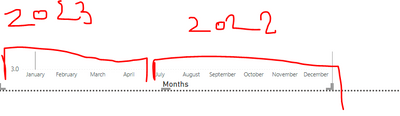
I have the table where my data column looks like this but my visual is showing data ordered by months (January comes before December) I would like the first data point to be the oldest one. So x-axis should start with July 2022, and August 2022........March 2023 and April 2023. Can this be accoplished?
Solved! Go to Solution.
@stribor45 , better use year of axis and expand and switch off concatenate label -off
Or sort your month on this column
month = if(month([Date]) <7, month([Date])+6 , month([Date])-6)
How to Create Sort Column and Solve Related Errors:
https://www.youtube.com/watch?v=KK1zu4MBb-c
Reformating the date to MMMM YYYYY and changing the axis type to "Categorical" resolved it for me.
Thank u for help!
Reformating the date to MMMM YYYYY and changing the axis type to "Categorical" resolved it for me.
@stribor45 , better use year of axis and expand and switch off concatenate label -off
Or sort your month on this column
month = if(month([Date]) <7, month([Date])+6 , month([Date])-6)
How to Create Sort Column and Solve Related Errors:
https://www.youtube.com/watch?v=KK1zu4MBb-c
If you have recently started exploring Fabric, we'd love to hear how it's going. Your feedback can help with product improvements.
A new Power BI DataViz World Championship is coming this June! Don't miss out on submitting your entry.
Experience the highlights from FabCon & SQLCon, available live and on-demand starting April 14th.
| User | Count |
|---|---|
| 47 | |
| 44 | |
| 40 | |
| 20 | |
| 15 |
| User | Count |
|---|---|
| 70 | |
| 67 | |
| 32 | |
| 27 | |
| 25 |