This time we’re going bigger than ever. Fabric, Power BI, SQL, AI and more. We're covering it all. You won't want to miss it.
Learn moreDid you hear? There's a new SQL AI Developer certification (DP-800). Start preparing now and be one of the first to get certified. Register now
Hello,
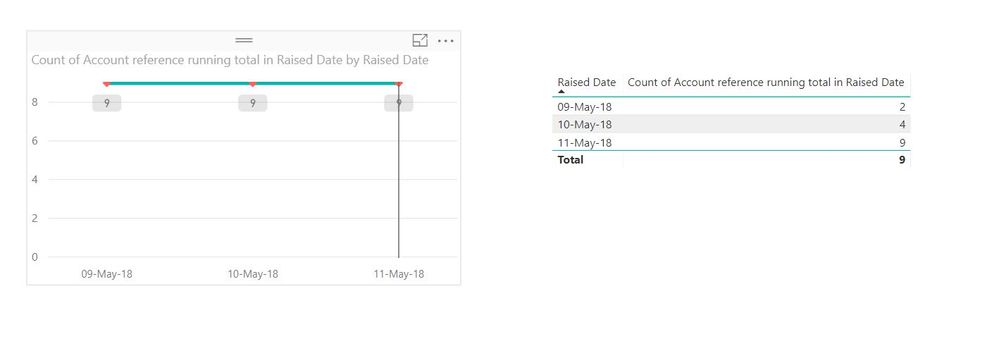
I am quite new on Power Bi and currently stuck with showing a running total on a line chart. So, I have a dataset with orders raised per day.I want to show the running total of total orders per day. I have calculated the running total and it works fine on a table. However, when I add the measure on a line chart I always get the overall total. I am not sure what I am doing wrong.
Any ideas would be appreciated
thanks
George
Solved! Go to Solution.
Hi @geokon
Looks like you have your running total running ok for your table so it could just be a field selection issue on the axis.
Make a copy of the table visual (Ctrl-C and Ctrl-V) to duplicate it. Then on the duplicate, make it a standard linechart and see what happens.
Hi @geokon
Looks like you have your running total running ok for your table so it could just be a field selection issue on the axis.
Make a copy of the table visual (Ctrl-C and Ctrl-V) to duplicate it. Then on the duplicate, make it a standard linechart and see what happens.
Hi Phil,
You were right. Just realised that the raised date was from a different dataset. Sounds like a rookie mistake.
Thanks!
Check out the April 2026 Power BI update to learn about new features.
Sign up to receive a private message when registration opens and key events begin.
If you have recently started exploring Fabric, we'd love to hear how it's going. Your feedback can help with product improvements.
| User | Count |
|---|---|
| 34 | |
| 31 | |
| 25 | |
| 20 | |
| 16 |
| User | Count |
|---|---|
| 61 | |
| 49 | |
| 28 | |
| 23 | |
| 23 |