Join us at FabCon Atlanta from March 16 - 20, 2026, for the ultimate Fabric, Power BI, AI and SQL community-led event. Save $200 with code FABCOMM.
Register now!Learn from the best! Meet the four finalists headed to the FINALS of the Power BI Dataviz World Championships! Register now
Hello,
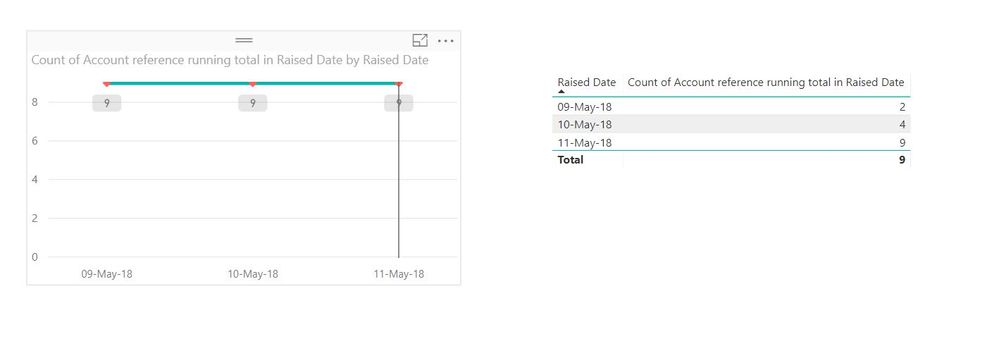
I am quite new on Power Bi and currently stuck with showing a running total on a line chart. So, I have a dataset with orders raised per day.I want to show the running total of total orders per day. I have calculated the running total and it works fine on a table. However, when I add the measure on a line chart I always get the overall total. I am not sure what I am doing wrong.
Any ideas would be appreciated
thanks
George
Solved! Go to Solution.
Hi @geokon
Looks like you have your running total running ok for your table so it could just be a field selection issue on the axis.
Make a copy of the table visual (Ctrl-C and Ctrl-V) to duplicate it. Then on the duplicate, make it a standard linechart and see what happens.
Hi @geokon
Looks like you have your running total running ok for your table so it could just be a field selection issue on the axis.
Make a copy of the table visual (Ctrl-C and Ctrl-V) to duplicate it. Then on the duplicate, make it a standard linechart and see what happens.
Hi Phil,
You were right. Just realised that the raised date was from a different dataset. Sounds like a rookie mistake.
Thanks!
Share feedback directly with Fabric product managers, participate in targeted research studies and influence the Fabric roadmap.
Check out the February 2026 Power BI update to learn about new features.
| User | Count |
|---|---|
| 54 | |
| 51 | |
| 39 | |
| 15 | |
| 14 |
| User | Count |
|---|---|
| 93 | |
| 79 | |
| 37 | |
| 27 | |
| 25 |