Share feedback directly with Fabric product managers, participate in targeted research studies and influence the Fabric roadmap.
Sign up nowGet Fabric certified for FREE! Don't miss your chance! Learn more
Hello, I have a SQL table populated with scores 0-5 at different places in time. Please note I am using Direct Query in this file so I cannot create any new tables.
| CustID | current_score | 6_months_ago | 12_monthsago | 18_months_ago | 24_months_ago |
| A1 | 3 | 2 | 2 | 2 | 3 |
| B1 | 0 | 1 | 4 | 4 | blank |
| C1 | 2 | 3 | blank | blank | 5 |
I need to create a line chart for the average of scores at each point in time:
x-axis is the points in time (current_score, 6_months_ago, 12_months_ago, etc.)
y-axis is the average score (first dot will be average of current_score = ((3+0+2)/3).
So I will have 5 dots across the length of the visual with lines connecting those dots.
I do have blanks (not nulls) in the dataset that need to be trimmed.
Thanks for any help!
Carly
Solved! Go to Solution.
Hi @sotoc
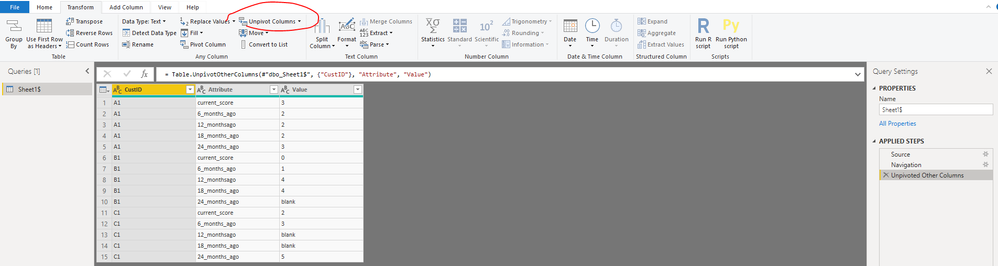
Open edit queries,
Click on "CustID" column, then select "Transform->Unpivot columns->Unpivot other columns",
Close&&apply
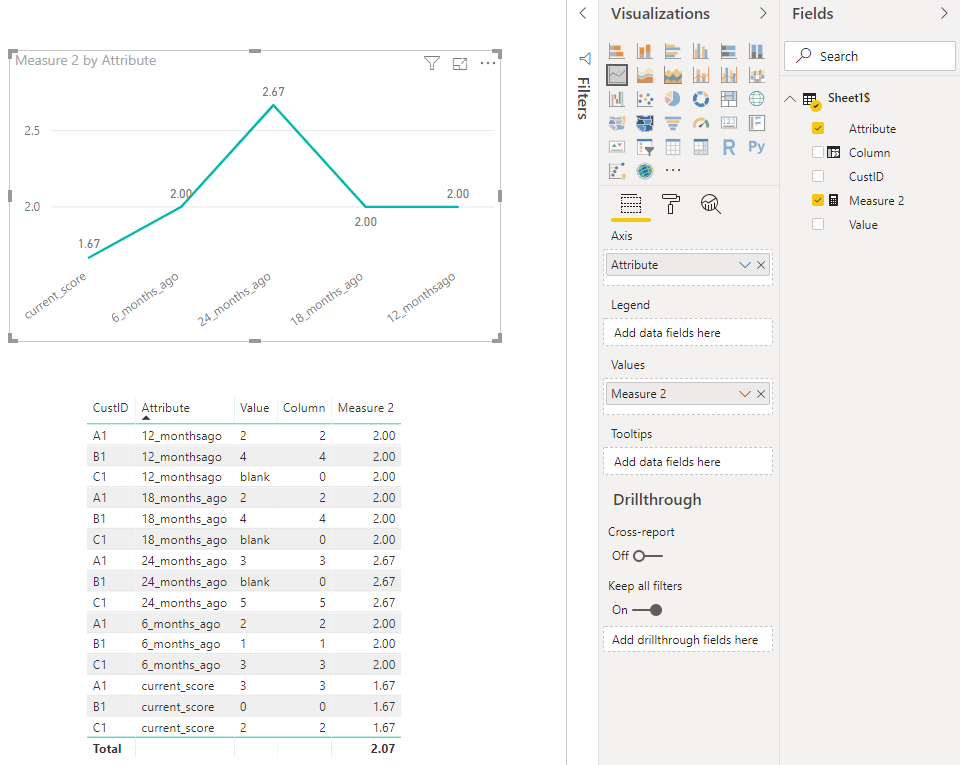
Create a column
Column = IF([Value]="blank","0",[Value])
Then change its data type to "whole number"
Then Create a measure
Measure 2 = CALCULATE(AVERAGE('Sheet1$'[Column]),ALLEXCEPT('Sheet1$','Sheet1$'[Attribute]))
Best Regards
Maggie
Community Support Team _ Maggie Li
If this post helps, then please consider Accept it as the solution to help the other members find it more quickly.
Hi @sotoc
Open edit queries,
Click on "CustID" column, then select "Transform->Unpivot columns->Unpivot other columns",
Close&&apply
Create a column
Column = IF([Value]="blank","0",[Value])
Then change its data type to "whole number"
Then Create a measure
Measure 2 = CALCULATE(AVERAGE('Sheet1$'[Column]),ALLEXCEPT('Sheet1$','Sheet1$'[Attribute]))
Best Regards
Maggie
Community Support Team _ Maggie Li
If this post helps, then please consider Accept it as the solution to help the other members find it more quickly.
If you love stickers, then you will definitely want to check out our Community Sticker Challenge!
Check out the January 2026 Power BI update to learn about new features.
| User | Count |
|---|---|
| 62 | |
| 58 | |
| 45 | |
| 21 | |
| 18 |
| User | Count |
|---|---|
| 121 | |
| 116 | |
| 37 | |
| 34 | |
| 30 |