cancel
Showing results for 
Search instead for 
Did you mean: 

Try your skills in the Power BI Dataviz World Championship! Round one ends June 26. Join now

Reply
sotoc
Advocate I
Advocate I

Line Chart Without Real Dates - Direct Query

Hello,  I have a SQL table populated with scores 0-5 at different places in time. Please note I am using Direct Query in this file so I cannot create any new tables.


CustIDcurrent_score6_months_ago12_monthsago18_months_ago24_months_ago
A132223
B10144blank
C123blankblank5


I need to create a line chart for the average of scores at each point in time:

x-axis is the points in time (current_score, 6_months_ago, 12_months_ago, etc.)

y-axis is the average score (first dot will be average of current_score = ((3+0+2)/3).


So I will have 5 dots across the length of the visual with lines connecting those dots.
I do have blanks (not nulls) in the dataset that need to be trimmed. 


Thanks for any help!

Carly

1 ACCEPTED SOLUTION
v-juanli-msft
Community Support
Community Support

Hi @sotoc 
Open edit queries,
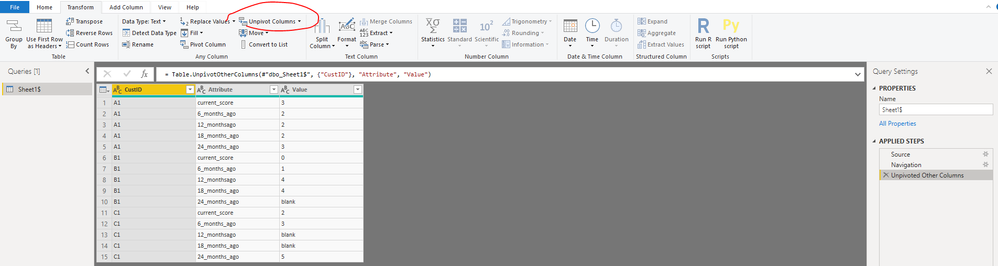
Click on "CustID" column, then select "Transform->Unpivot columns->Unpivot other columns",

1.png

Close&&apply

Create a column

Column = IF([Value]="blank","0",[Value])

Then change its data type to "whole number"

3.png


Then Create a measure

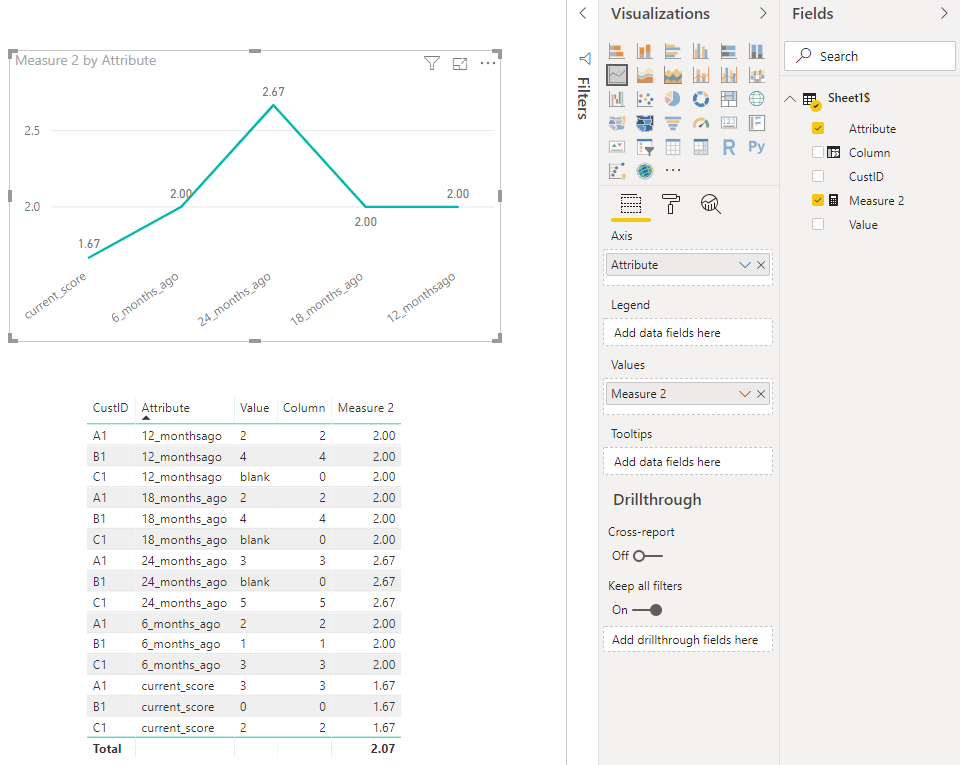
Measure 2 = CALCULATE(AVERAGE('Sheet1$'[Column]),ALLEXCEPT('Sheet1$','Sheet1$'[Attribute]))

2.png

Best Regards
Maggie


Community Support Team _ Maggie Li
If this post helps, then please consider Accept it as the solution to help the other members find it more quickly.

View solution in original post

1 REPLY 1
v-juanli-msft
Community Support
Community Support

Hi @sotoc 
Open edit queries,
Click on "CustID" column, then select "Transform->Unpivot columns->Unpivot other columns",

1.png

Close&&apply

Create a column

Column = IF([Value]="blank","0",[Value])

Then change its data type to "whole number"

3.png


Then Create a measure

Measure 2 = CALCULATE(AVERAGE('Sheet1$'[Column]),ALLEXCEPT('Sheet1$','Sheet1$'[Attribute]))

2.png

Best Regards
Maggie


Community Support Team _ Maggie Li
If this post helps, then please consider Accept it as the solution to help the other members find it more quickly.

Helpful resources

Announcements
Fabric Data Days is here Carousel

Fabric Data Days 2026

Don't miss out on Data Days, June 15 through August 7. Learn Fabric, Power BI, SQL, AI and more.

May Power BI Update Carousel

Power BI Monthly Update - May 2026

Check out the May 2026 Power BI update to learn about new features.

Power BI DataViz World Championships carousel

Power BI DataViz World Championships - June 2026

A new Power BI DataViz World Championship is coming this June! Don't miss out on submitting your entry.