cancel
Showing results for 
Search instead for 
Did you mean: 

The Power BI Data Visualization World Championships is back! Get ahead of the game and start preparing now! Learn more

Reply
Peter-SDB
Regular Visitor

Line Chart - Similar Problem but using numerical data

I wish to use a Line Chart visual to plot monthly utility usage for Gas & Electric meter readings. My meter data is sourced using dates and numbers in Excel. The readings are simple numbers not calculated values.
I wish to plot Energy Readings (y-axis) vs Time (x-axis).
Even though both the Excel and Power-BI Data type are both numerical and the data column is set to 'Don't summarize' when I drag the data into the y-axis well it is aggregated and labelled as 'COUNT OF...'. There is no 'Don't Sum' option offered.
I have found the document help page, 'Work with aggregates (Sum, average and so on) in Power BI', helpful but am still unable to solve the problem.
Thanks

1 ACCEPTED SOLUTION

Hi @Peter-SDB ,


Thanks for properly sharing the info.


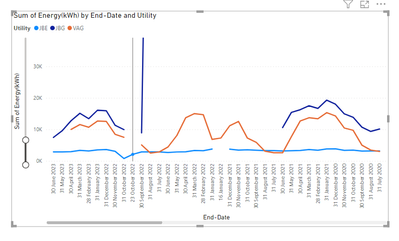
I have checked it, it looks like this is standard feature of line chart and your data is that way. On one single date e.g. 30 Jun 2023, you show two data points and likewise many end dates have multiple energy readings, so if you plot a line chart with energy and end date, one single date on x axis has to show 2 data points or more, so it can show sum and count and so on but not the dont summarize option. Though if you use table visual for same data, you will see dont summarize option as well.


If you wish to see multiple data on one date, use some identifier as legend or with some other ways:


mahenkj2_0-1689788615185.png

Hope it helps. 


View solution in original post

4 REPLIES 4
Peter-SDB
Regular Visitor

Hi @mahenkj2

Many thanks for this.

Pls find link to both files shared from Dropbox: Link to pbix in Dropbox Link to xlsx in Dropbox 

Peter

Hi @Peter-SDB ,


Thanks for properly sharing the info.


I have checked it, it looks like this is standard feature of line chart and your data is that way. On one single date e.g. 30 Jun 2023, you show two data points and likewise many end dates have multiple energy readings, so if you plot a line chart with energy and end date, one single date on x axis has to show 2 data points or more, so it can show sum and count and so on but not the dont summarize option. Though if you use table visual for same data, you will see dont summarize option as well.


If you wish to see multiple data on one date, use some identifier as legend or with some other ways:


mahenkj2_0-1689788615185.png

Hope it helps. 


Hi @mahenkj2 ,

Many thanks for your time on this. Peter

mahenkj2
Solution Sage
Solution Sage

Hi @Peter-SDB 


Pls post a sample data, better excel and power bi file both after removing any sensitive data.

Else paste data so as to simply copy, but better if u post in Excel and power bi file, easier to simulate.


Hope it helps.

Helpful resources

Announcements
Power BI DataViz World Championships

Power BI Dataviz World Championships

The Power BI Data Visualization World Championships is back! Get ahead of the game and start preparing now!

December 2025 Power BI Update Carousel

Power BI Monthly Update - December 2025

Check out the December 2025 Power BI Holiday Recap!

FabCon Atlanta 2026 carousel

FabCon Atlanta 2026

Join us at FabCon Atlanta, March 16-20, for the ultimate Fabric, Power BI, AI and SQL community-led event. Save $200 with code FABCOMM.