Join us at FabCon Atlanta from March 16 - 20, 2026, for the ultimate Fabric, Power BI, AI and SQL community-led event. Save $200 with code FABCOMM.
Register now!The Power BI Data Visualization World Championships is back! Get ahead of the game and start preparing now! Learn more
Hi,
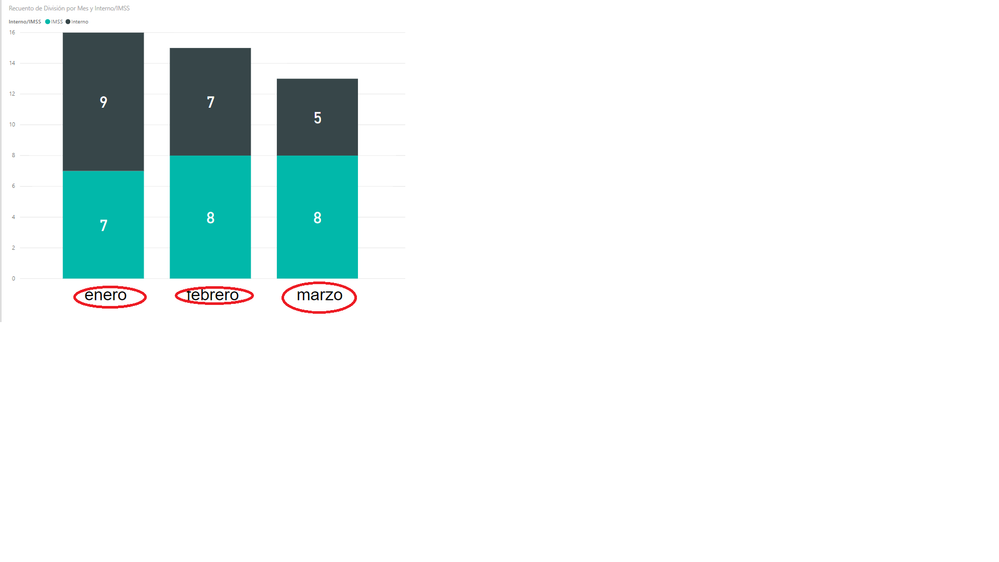
I've been trying to change the month legend format from "enero" to "Enero" in my powerbi graph, could someone help me?
Currently my date format is dd/mm/yyyy 00:00 am
Actual output
Hey @dantedg1,
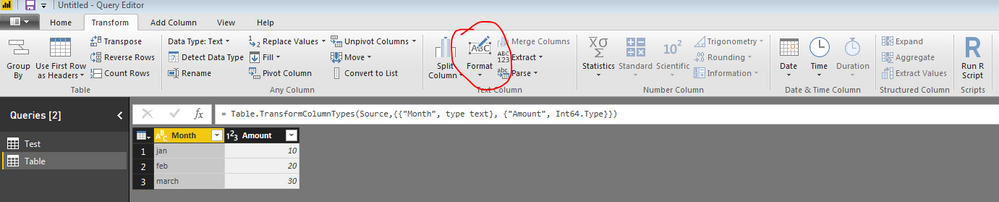
This isn't a problem with your legend, but a problem with your data. If you change your data to have the correct capitalization, then these axis labels will look how you want. You can do this easily by going to Query Editor -> Transform -> Format -> Capitalize Each Word (While you've selected the proper column).
Hope this helps,
Parker
Hello Parker,
Problem is that my column format is on Date, applying the format change just changes it to numbers. DO you have any other suggestions?
Right, I see what you're saying. Sorry I don't know how you would change how Power BI represents a month in a certain language. If you wanted to transform the date field into a text of the month name, that would be:
CalculatedMonth = FORMAT('Table'[Date], "MMMM")Then you could capitalize like I suggested in the previous comment.
Hope this works or you find another solution,
Parker
The Power BI Data Visualization World Championships is back! Get ahead of the game and start preparing now!
| User | Count |
|---|---|
| 39 | |
| 37 | |
| 33 | |
| 32 | |
| 29 |
| User | Count |
|---|---|
| 132 | |
| 88 | |
| 82 | |
| 68 | |
| 64 |