cancel
Showing results for 
Search instead for 
Did you mean: 

Learn from the best! Meet the four finalists headed to the FINALS of the Power BI Dataviz World Championships! Register now

Reply
EHa
Helper I
Helper I

Left Joining Tables using Power Query / Measures

Hi All, Sorry for the simplicity of the question - I had a look through a few similar questions but couldn't find any solutions which helped me out.

I understand my tables are not of the easiest set up, but they need to stay in the current format to work with the rest of my report.

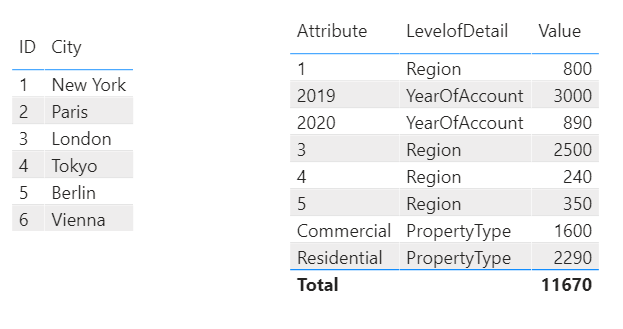
This is my simple example: 
Capture.PNG

 Put simply, I would like the name of the city , instead of the ID, when LevelOfDetail is Region. 

I can't just link up the two tables and use region instead of attribute , as I would also like the attribute column to show for the other levelofdetail values. My two first approaches were to 1) - create a measure with an if function which used the reference to find the city when levelofdetail is city, and just used the existing attribute when not. 2) - write a left join between the two tables in power query ( these two tables will be import from sql) , and then sort the tables to the correct form using the toolbars in power query.

I couldn't get either to work, so if anyone has the solyution, that would be greatly appreciated.

Thanks a lot,

EHa


1 ACCEPTED SOLUTION
v-lili6-msft
Community Support
Community Support

hi  @EHa 

for your case, I suggest you create a new attribute column in table2 by this logic:

New Attribute = 
VAR _ID=IF('Table 2'[LevelofDetail]="Region",VALUE('Table 2'[Attribute])) RETURN
IF('Table 2'[LevelofDetail]="Region",LOOKUPVALUE('Table 1'[City],'Table 1'[ID],_ID),'Table 2'[Attribute])

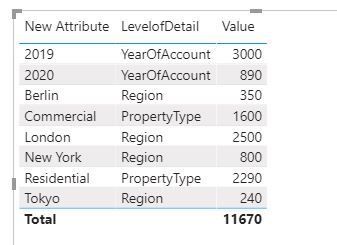
Now when create a visual, use this new attribute.

9.JPG


and here is sample pbix file, please try it.


Regards,

Lin

Community Support Team _ Lin
If this post helps, then please consider Accept it as the solution to help the other members find it more quickly.

View solution in original post

2 REPLIES 2
v-lili6-msft
Community Support
Community Support

hi  @EHa 

for your case, I suggest you create a new attribute column in table2 by this logic:

New Attribute = 
VAR _ID=IF('Table 2'[LevelofDetail]="Region",VALUE('Table 2'[Attribute])) RETURN
IF('Table 2'[LevelofDetail]="Region",LOOKUPVALUE('Table 1'[City],'Table 1'[ID],_ID),'Table 2'[Attribute])

Now when create a visual, use this new attribute.

9.JPG


and here is sample pbix file, please try it.


Regards,

Lin

Community Support Team _ Lin
If this post helps, then please consider Accept it as the solution to help the other members find it more quickly.

Hi Lin,

That's great, thanks a lot.

Appreciate the effort in remaking it too, very clear now.

Cheers,

EHa

@v-lili6-msft 


Helpful resources

Announcements
Power BI DataViz World Championships carousel

Power BI DataViz World Championships - June 2026

A new Power BI DataViz World Championship is coming this June! Don't miss out on submitting your entry.

Join our Fabric User Panel

Join our Fabric User Panel

Share feedback directly with Fabric product managers, participate in targeted research studies and influence the Fabric roadmap.

March Power BI Update Carousel

Power BI Community Update - March 2026

Check out the March 2026 Power BI update to learn about new features.