cancel
Showing results for 
Search instead for 
Did you mean: 

Join the FabCon + SQLCon recap series. Up next: Power BI, Real-Time Intelligence, IQ and AI, and Data Factory take center stage. All sessions are available on-demand after the live show. Register now

Reply
Anonymous
Not applicable

Left 2 characters from column - Direct Query

Hi there,


I'm using Direct Query and want to create a slicer / report based on the left 2 characters of a column.


Example source table:

Code          Claim

AZ12          X

AB123       X1

AZ23         X3


Requested Report:

Left 2 Code        Amount Claims

AZ                     2

AB                      1


I'm using the following DAX for left 2 characters. When I get rid of the column Code, also the Left 2 Code measure goes empty. Any tips on solving this? I cannot add a column because of direct query.

Selected 2 character = 
var selected= if(HASONEVALUE('Table'[Column]),VALUES('Table'[Column]),BLANK())
return
If(selected<>BLANK(),LEFT(selected,2))


1 ACCEPTED SOLUTION
amitchandak
Super User
Super User

@Anonymous , if it is a new column simply use

 LEFT('Table'[Column],2)

Share with Power BI Enthusiasts: Full Power BI Video (20 Hours) YouTube
Microsoft Fabric Series 60+ Videos YouTube
Microsoft Fabric Hindi End to End YouTube

View solution in original post

3 REPLIES 3
Anonymous
Not applicable

Hi @Anonymous ,


Could you tell me if your problem has been solved? If it is, kindly Accept it as the solution. More people will benefit from it.


Best Regards,
Eyelyn Qin

Anonymous
Not applicable

Hi @Anonymous ,


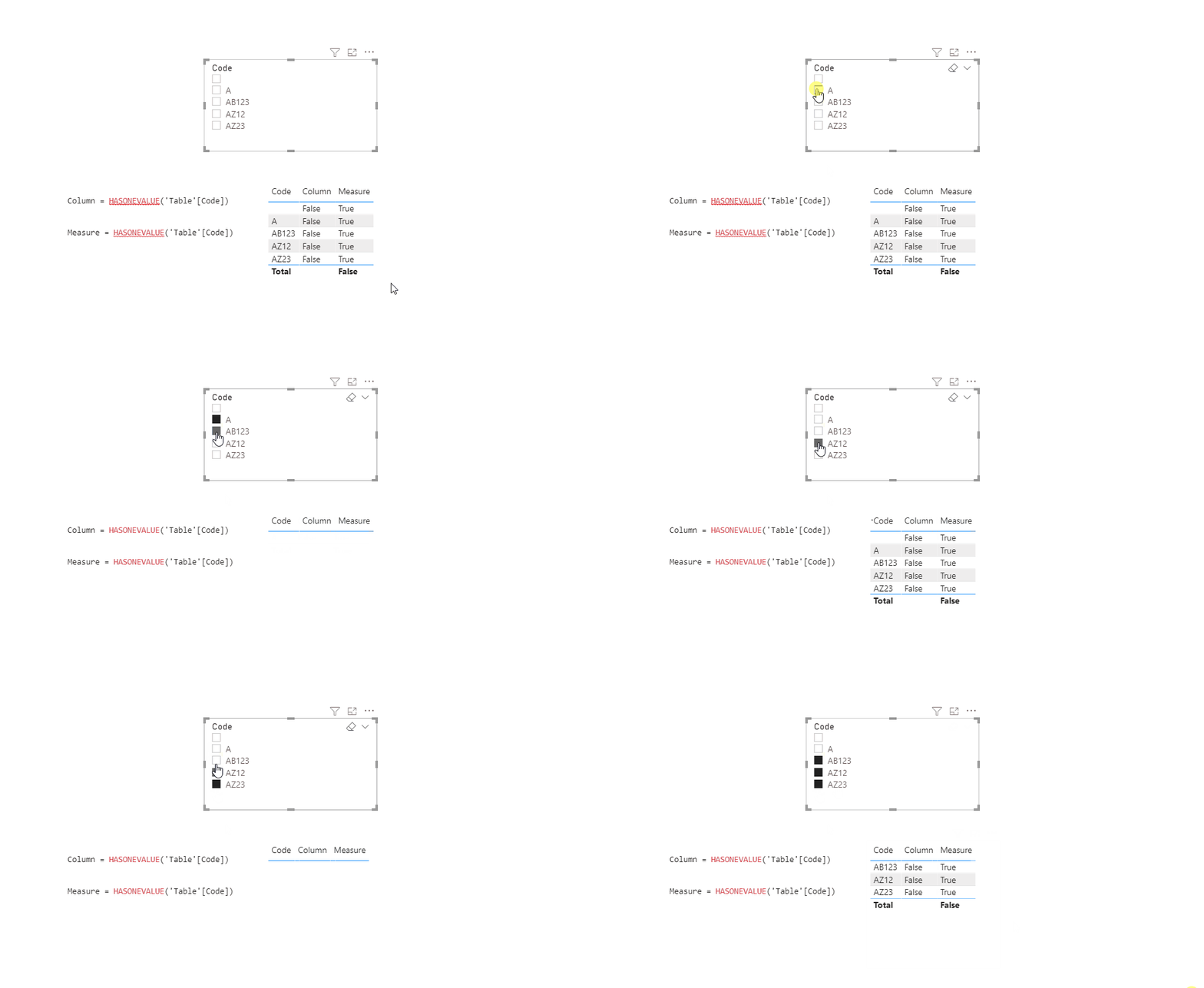
According to the official document, HASONEVALUE() returns TRUE when the context for columnName has been filtered down to one distinct value only. Otherwise is FALSE.


In addition, calculated columns could not be dynamic that means values won't change according to the user selection. So It's not appropriate to use HASONEVALUE().


Please take a look at the below screenshot to understand the difference between Column and Measure.

12.18.4.1.gif

In summary, as @amitchandak suggest , please just use LEFT() function directly.

12.18.4.2.PNG

Here is the pbix file.


Best Regards,
Eyelyn Qin


If this post helps, then please consider Accept it as the solution to help the other members find it more quickly.

amitchandak
Super User
Super User

@Anonymous , if it is a new column simply use

 LEFT('Table'[Column],2)

Share with Power BI Enthusiasts: Full Power BI Video (20 Hours) YouTube
Microsoft Fabric Series 60+ Videos YouTube
Microsoft Fabric Hindi End to End YouTube

Helpful resources

Announcements
April Power BI Update Carousel

Power BI Monthly Update - April 2026

Check out the April 2026 Power BI update to learn about new features.

New to Fabric survey Carousel

New to Fabric Survey

If you have recently started exploring Fabric, we'd love to hear how it's going. Your feedback can help with product improvements.

Power BI DataViz World Championships carousel

Power BI DataViz World Championships - June 2026

A new Power BI DataViz World Championship is coming this June! Don't miss out on submitting your entry.

FabCon and SQLCon Highlights Carousel

FabCon &SQLCon Highlights

Experience the highlights from FabCon & SQLCon, available live and on-demand starting April 14th.