Join us at FabCon Atlanta from March 16 - 20, 2026, for the ultimate Fabric, Power BI, AI and SQL community-led event. Save $200 with code FABCOMM.
Register now!Vote for your favorite vizzies from the Power BI Dataviz World Championship submissions. Vote now!
Hi Experts,
I am new to Power BI and have a question, i know how to get this in a pivot in excel but trying hard to convert the same idea in Power BI. I have data as below.
| Type(From table 1) | Item(From table 2) | Created on(From table 2) |
| Fruit | Apple | Jan 2 |
| Fruit | Apple | Jun 12 |
| Fruit | Orange | Sep 22 |
| Car | Honda | Mar 14 |
| Car | Nissan | May 14 |
| Car | BMW | Oct 24 |
| Vegetable | Carrot | Nov 16 |
| Vegetable | Carrot | Oct 10 |
| Vegetable | Carrot | Mar 22 |
I want a list to look like the below, which basically is the last day a record was created in that category.
| Type(From table 1) | Created on (From table 2) |
| Fruit | Sep 22 |
| Car | Oct 24 |
| Vegetable | Nov 16 |
With that result the created on column should be sorted from the last date first.
Thanks in advance for your help and response.
Solved! Go to Solution.
Hi @Titus_D
you can create this formula like this:
With kind regards from the town where the legend of the 'Pied Piper of Hamelin' is at home
FrankAT (Proud to be a Datanaut)
Hi @Titus_D
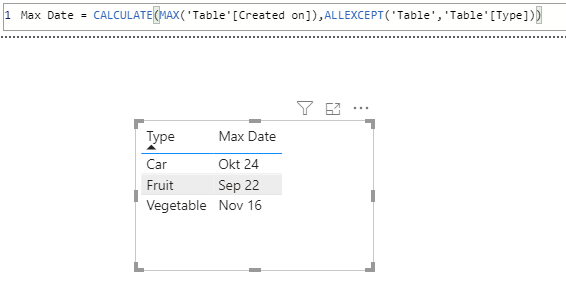
what about the following solution:
Max Date = CALCULATE(MAX('Table'[Created on]),ALLEXCEPT('Table','Table'[Type]))
With kind regards from the town where the legend of the 'Pied Piper of Hamelin' is at home
FrankAT (Proud to be a Datanaut)
@FrankAT thanks for your response.
I am completely new to Power BI so excuse me for some basic questions. Where is the place where i put that formula? Should i click on the column in the visualisation pane and then right click and select quick measure and put the formula there?
Hi @Titus_D
you can create this formula like this:
With kind regards from the town where the legend of the 'Pied Piper of Hamelin' is at home
FrankAT (Proud to be a Datanaut)
@Titus_D ,
I do not know how you are relating those table, if you are. However if you just drag the date column and change the aggregation to max, you get the result you want.
Vote for your favorite vizzies from the Power BI World Championship submissions!
If you love stickers, then you will definitely want to check out our Community Sticker Challenge!
Check out the January 2026 Power BI update to learn about new features.
| User | Count |
|---|---|
| 56 | |
| 52 | |
| 45 | |
| 17 | |
| 16 |
| User | Count |
|---|---|
| 108 | |
| 108 | |
| 39 | |
| 33 | |
| 25 |