Join us at FabCon Atlanta from March 16 - 20, 2026, for the ultimate Fabric, Power BI, AI and SQL community-led event. Save $200 with code FABCOMM.
Register now!The Power BI Data Visualization World Championships is back! It's time to submit your entry. Live now!
Hello Team,
I need help creating a table to show the last balance for my products. My table looks like the below:
| Date | Description | Balance |
| 11/11/2022 | A | 30 |
| 11/11/2022 | B | 25 |
| 10/11/2022 | C | 25 |
| 01/11/2022 | D | 20 |
| 20/10/2022 | A | 25 |
| 20/10/2022 | B | 20 |
| 19/10/2022 | C | 30 |
| 17/10/2022 | D | 21 |
| 08/09/2022 | A | 19 |
| 08/09/2022 | B | 19 |
| 07/09/2022 | C | 20 |
| 07/09/2022 | D | 18 |
| 07/09/2022 | E | 22 |
I need an answer like below:
| Date | Description | Balance |
| 11/11/2022 | A | 30 |
| 11/11/2022 | B | 25 |
| 10/11/2022 | C | 25 |
| 01/11/2022 | D | 20 |
| 07/09/2022 | E | 22 |
I tried using the lastdate function but it is not working. Any idea?
Thank you.
Kind Regards,
Hasvine
Solved! Go to Solution.
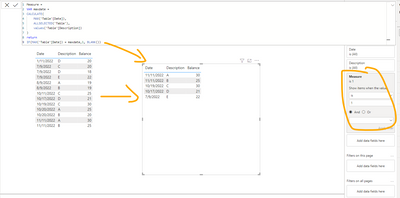
@Anonymous Here is the solution, hope it helps.
You can refer to the below also.
Hi @Anonymous ,
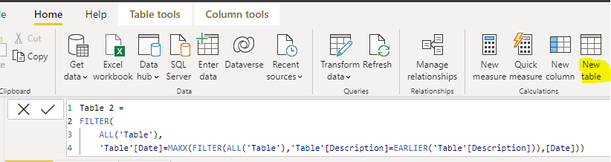
Here are the steps you can follow:
1. Create calculated table.
Table 2 =
FILTER(
ALL('Table'),
'Table'[Date]=MAXX(FILTER(ALL('Table'),'Table'[Description]=EARLIER('Table'[Description])),[Date]))
2. Result:
Best Regards,
Liu Yang
If this post helps, then please consider Accept it as the solution to help the other members find it more quickly
@Anonymous Here is the solution, hope it helps.
You can refer to the below also.
Hi AbbasG,
I appreciate your help.
It works fine. However, if you have two transactions on the same date the table shows both transactions.
Example:
| Date | Description | Balance |
| 17/11/2022 | A | 25 |
| 17/11/2022 | A | 30 |
I need to show the latest. Is there a way?
Many thanks for your help.
Kind Regards,
Hasvine
@Anonymous per my experience, there should be some data point basis on which we can identify the latest transaction. for example time stamp or a combination of date and time instead of just date.
Does your data have something like that??
| User | Count |
|---|---|
| 51 | |
| 38 | |
| 33 | |
| 22 | |
| 19 |
| User | Count |
|---|---|
| 136 | |
| 102 | |
| 59 | |
| 36 | |
| 35 |