This is best Fabric, Power BI, SQL and AI community event. How do we know? The last event sold out! Save €200 with code FABCMTY200.
Register nowThe Fabric community is upgrading! Read all of the details including the timeline and what you can expect. Learn more
Hey all,
I've seen posts about this, but couldn't find the appropiate solution for this.
I have a card which shows my last refresh date, i did it doing the following:
'' Last refresh column = NOW() ''
Then i use this measure in the card:
'' Last refresh date = MAX('tbl_sales'[Last refresh column]) ''
Everything works fine in desktop.
But when i upload the report onto Service it shows the last refresh time - 1 hour.
So instead of 11;00 it would show 10;00.
Does anyone have any idea on how to fix this?
Solved! Go to Solution.
It shows the current date and time in UTC. There is already an idea, you may leave a comment and vote it up.
Hi @BeemsC
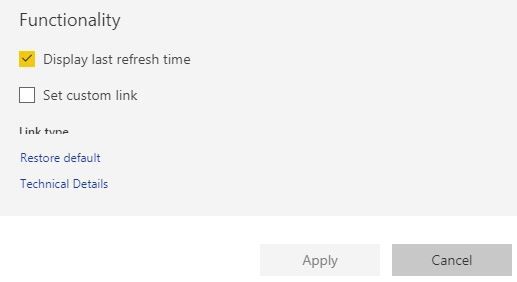
On your dashboard you can click on "three dots" towards the right hand side of a tile and go to "edit details" to enable last refresh time.
I think this serves the same purpose which your trying to achieve.
Hey,
Thanks for the reply.
The problem is, instead of first going to a dashboard and the clicking on it, it's added as a report.
I don't think it's possible for this case
Join us in Barcelona for FabCon and SQLCon, the Fabric, Power BI, SQL, and AI community event. Save €200 with code FABCMTY200.
| User | Count |
|---|---|
| 24 | |
| 22 | |
| 20 | |
| 18 | |
| 14 |
| User | Count |
|---|---|
| 31 | |
| 26 | |
| 23 | |
| 20 | |
| 20 |