Don't miss your chance to take exam DP-600 or DP-700 on us!
Request nowLearn from the best! Meet the four finalists headed to the FINALS of the Power BI Dataviz World Championships! Register now
Hi PowerBi community,
I would like to have a measure for last month.
For example if today is 02/03/2020 I would like to view the accumulated productivity for the FEB. (1st-29th of FEB).
Could you please advise.
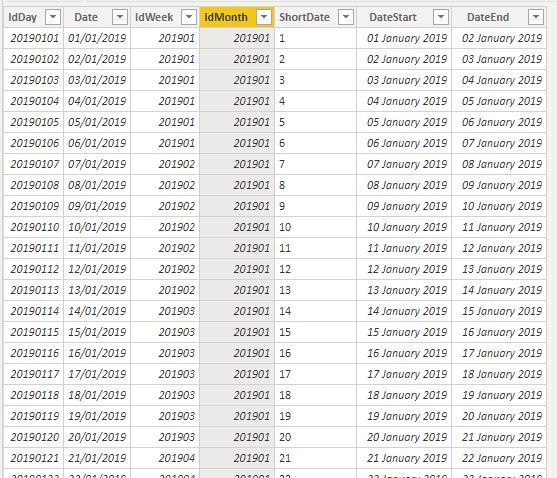
I have a dates table which looks like
Thank you in advance.
Hi, @Anonymous
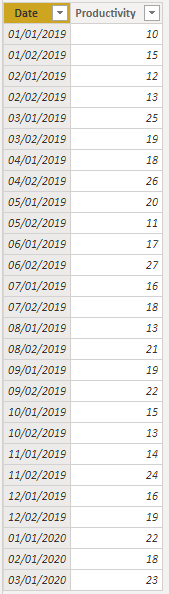
Based on your description, I created data to reproduce your scenario.
Table:
DateTable:
DateTable = CALENDAR(MIN('Table'[Date]),TODAY())
There is a one-to-one relationship between two tables.
You may create a measure as follows.
previous accumulated productivity =
TOTALMTD(
SUM('Table'[Productivity]),
ENDOFMONTH(
DATEADD(DateTable[Date],-1,MONTH)
)
)
Result:
Best Regards
Allan
If this post helps, then please consider Accept it as the solution to help the other members find it more quickly.
If time intelligence fails you, you can always do it the hard way. See if my Time Intelligence the Hard Way provides a different way of accomplishing what you are going for.
https://community.powerbi.com/t5/Quick-Measures-Gallery/Time-Intelligence-quot-The-Hard-Way-quot-TIT...
Make sure your table is joined with a date table use time intelligence functions like datesmtd, totalmtd etc
example
last MTD (complete) Sales = CALCULATE(SUM(Sales[Sales Amount]),DATESMTD(ENDOFMONTH(dateadd('Date'[Date],-1,MONTH))))
Other
MTD Sales = CALCULATE(SUM(Sales[Sales Amount]),DATESMTD('Date'[Date]))
last MTD Sales = CALCULATE(SUM(Sales[Sales Amount]),DATESMTD(dateadd('Date'[Date],-1,MONTH)))
last year MTD (complete) Sales = CALCULATE(SUM(Sales[Sales Amount]),DATESMTD(ENDOFMONTH(dateadd('Date'[Date],-12,MONTH))))
last year MTD Sales = CALCULATE(SUM(Sales[Sales Amount]),DATESMTD(dateadd('Date'[Date],-12,MONTH)))
To get the best of the time intelligence function. Make sure you have a date calendar and it has been marked as the date in model view. Also, join it with the date column of your fact/s. Refer :
https://radacad.com/creating-calendar-table-in-power-bi-using-dax-functions
https://www.archerpoint.com/blog/Posts/creating-date-table-power-bi
https://www.sqlbi.com/articles/creating-a-simple-date-table-in-dax/
https://docs.microsoft.com/en-us/dax/lastdate-function-dax
See the above documentation.
measure=LASTDATE(Max(table[date]))
column=LASTDATE(table[Column])
Thanks & regards,
Pravin Wattamwar
www.linkedin.com/in/pravin-p-wattamwar
If I resolve your problem Mark it as a solution and give kudos.
Share feedback directly with Fabric product managers, participate in targeted research studies and influence the Fabric roadmap.
Check out the February 2026 Power BI update to learn about new features.
| User | Count |
|---|---|
| 51 | |
| 40 | |
| 37 | |
| 14 | |
| 14 |
| User | Count |
|---|---|
| 84 | |
| 69 | |
| 38 | |
| 29 | |
| 27 |