cancel
Showing results for 
Search instead for 
Did you mean: 

Did you hear? There's a new SQL AI Developer certification (DP-800). Start preparing now and be one of the first to get certified. Register now

Reply
Anonymous
Not applicable

Last Month - date function

Hi PowerBi community, 


I would like to have a measure for last month. 

For example if today is 02/03/2020 I would like to view the accumulated productivity for the FEB. (1st-29th of FEB). 


Could you please advise. 


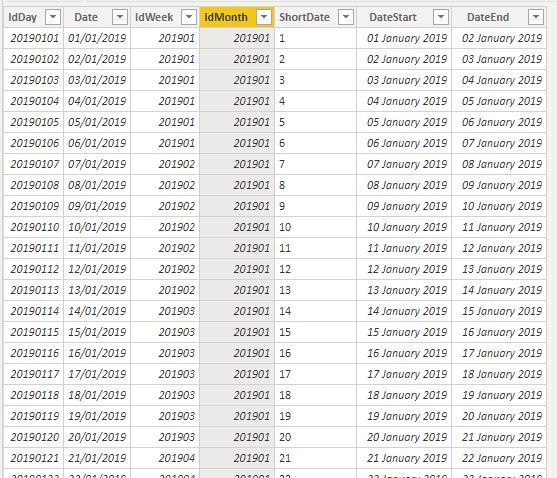
I have a dates table which looks like  Date table.JPG

Thank you in advance. 

4 REPLIES 4
v-alq-msft
Community Support
Community Support

Hi, @Anonymous 


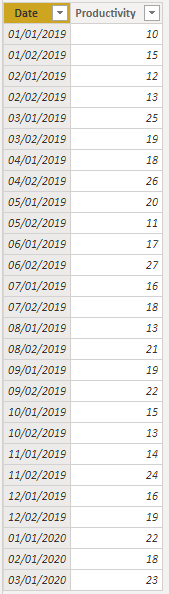
Based on your description, I created data to reproduce your scenario.

Table:

a1.png

DateTable:

DateTable = CALENDAR(MIN('Table'[Date]),TODAY())


There is a one-to-one relationship between two tables.


You may create a measure as follows.

previous accumulated productivity = 
TOTALMTD(
    SUM('Table'[Productivity]),
    ENDOFMONTH(
           DATEADD(DateTable[Date],-1,MONTH)
    )
)


Result:

a5.png

a6.png


Best Regards

Allan


If this post helps, then please consider Accept it as the solution to help the other members find it more quickly.

Greg_Deckler
Community Champion
Community Champion

If time intelligence fails you, you can always do it the hard way. See if my Time Intelligence the Hard Way provides a different way of accomplishing what you are going for.

https://community.powerbi.com/t5/Quick-Measures-Gallery/Time-Intelligence-quot-The-Hard-Way-quot-TIT...


Follow on LinkedIn
@ me in replies or I'll lose your thread!!!
Instead of a Kudo, please vote for this idea
Become an expert!: Enterprise DNA
External Tools: MSHGQM
YouTube Channel!: Microsoft Hates Greg
Latest book!:
DAX For Humans

DAX is easy, CALCULATE makes DAX hard...
amitchandak
Super User
Super User

Make sure your table is joined with a date table use time intelligence functions like datesmtd, totalmtd etc

example

last MTD (complete) Sales =  CALCULATE(SUM(Sales[Sales Amount]),DATESMTD(ENDOFMONTH(dateadd('Date'[Date],-1,MONTH))))

Other

MTD Sales = CALCULATE(SUM(Sales[Sales Amount]),DATESMTD('Date'[Date]))
last MTD Sales = CALCULATE(SUM(Sales[Sales Amount]),DATESMTD(dateadd('Date'[Date],-1,MONTH)))
last year MTD (complete) Sales =  CALCULATE(SUM(Sales[Sales Amount]),DATESMTD(ENDOFMONTH(dateadd('Date'[Date],-12,MONTH))))
last year MTD Sales =  CALCULATE(SUM(Sales[Sales Amount]),DATESMTD(dateadd('Date'[Date],-12,MONTH)))

To get the best of the time intelligence function. Make sure you have a date calendar and it has been marked as the date in model view. Also, join it with the date column of your fact/s. Refer :
https://radacad.com/creating-calendar-table-in-power-bi-using-dax-functions
https://www.archerpoint.com/blog/Posts/creating-date-table-power-bi
https://www.sqlbi.com/articles/creating-a-simple-date-table-in-dax/


Share with Power BI Enthusiasts: Full Power BI Video (20 Hours) YouTube
Microsoft Fabric Series 60+ Videos YouTube
Microsoft Fabric Hindi End to End YouTube
Anonymous
Not applicable

https://docs.microsoft.com/en-us/dax/lastdate-function-dax


See the above documentation.


measure=LASTDATE(Max(table[date]))


column=LASTDATE(table[Column])


Thanks & regards,
Pravin Wattamwar
www.linkedin.com/in/pravin-p-wattamwar

If I resolve your problem Mark it as a solution and give kudos.

Helpful resources

Announcements
April Power BI Update Carousel

Power BI Monthly Update - April 2026

Check out the April 2026 Power BI update to learn about new features.

Fabric SQL PBI Data Days

Data Days 2026 coming soon!

Sign up to receive a private message when registration opens and key events begin.

New to Fabric survey Carousel

New to Fabric Survey

If you have recently started exploring Fabric, we'd love to hear how it's going. Your feedback can help with product improvements.

Power BI DataViz World Championships carousel

Power BI DataViz World Championships - June 2026

A new Power BI DataViz World Championship is coming this June! Don't miss out on submitting your entry.