I'm aware of the pivot functionality in the query editor, but the results from that are pretty static.
What I wish BI had was a more dynamic ability to pivot.
Imagine a table,
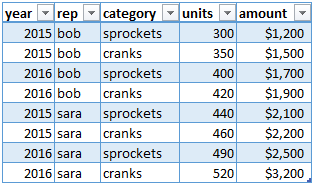
I can get a time series of total sales out of that.
But if I want a stacked bar chart, breaking down the time series of sales by rep or category, I would have to pivot on rep and category. Ok fine, so now I have 4 more columns, 'bob', 'sara', 'cranks', 'sprockets'. But what if I want a time series of stacked bar charts for both units and amounts? Ok, so I insert a custom column, prepending 'units' to the original value and then pivoting on that, so now I've added 'units_bob' and 'units_sara', 'units_cranks' and 'units_sprockets'.
Kinda unwieldy. Now think about that in the context of a table with 20 columns and 140k rows. It just gets silly. It's all because the charting functions can't dynamically pivot.
Am I wrong? Am I missing something? Is there a better way to do it? Or should I stick with Excel for generating reports?


