Get Fabric or SQL Certified for Free.
Get certified for free when you join Fabric Data Days 2026 and dive into Fabric, Power BI, SQL, AI, and other essential data skills.
Join now- Power BI forums
- Get Help with Power BI
- Desktop
- Service
- Report Server
- Power Query
- Mobile Apps
- Developer
- DAX Commands and Tips
- Custom Visuals Development Discussion
- Health and Life Sciences
- Power BI Spanish forums
- Translated Spanish Desktop
- Training and Consulting
- Instructor Led Training
- Dashboard in a Day for Women, by Women
- Galleries
- Data Stories Gallery
- Themes Gallery
- Contests Gallery
- QuickViz Gallery
- Quick Measures Gallery
- Visual Calculations Gallery
- Notebook Gallery
- Translytical Task Flow Gallery
- TMDL Gallery
- R Script Showcase
- Webinars and Video Gallery
- Ideas
- Custom Visuals Ideas (read-only)
- Issues
- Issues
- Events
- Upcoming Events
Try your skills in the Power BI Dataviz World Championship! Round one ends June 26. Join now
- Power BI forums
- Forums
- Get Help with Power BI
- Desktop
- Re: LINEST forEach
- Subscribe to RSS Feed
- Mark Topic as New
- Mark Topic as Read
- Float this Topic for Current User
- Bookmark
- Subscribe
- Printer Friendly Page


- Mark as New
- Bookmark
- Subscribe
- Mute
- Subscribe to RSS Feed
- Permalink
- Report Inappropriate Content
LINEST forEach
@AlexisOlson @bcdobbs @CNENFRNL
I am trying to crerate a measure using LINEST that would give me the slope but I have not been successful.
PFA what I have tried.
Following is what I desire
| Country | x | y | slope |
|---------|---|---|-------|
| C1      | 1 | 3 | 1.75  |
| C1      | 2 | 5 | 1.75  |
| C1      | 3 | 7 | 1.75  |
| C2      | 2 | 3 | 2.25  |
| C2      | 3 | 6 | 2.25  |
| C2      | 4 | 8 | 2.25  |
To the best of my knowledge, I am passing on the correct filtered table to LINEST

Thank you in advance
========================
Did I answer your question? Mark my post as a solution!
Proud to be a Super User
My Custom Visualization Projects
• Plotting Live Sound: Live Sound
• Beautiful News: Women in Parliament, Energy Mix, Shrinking Armies
• Visual Capitalist: Working Hrs
• Others: Easing Graph, Animated Calendar
MayViz Submissions
• Week 1: View
• Week 2: View
• Week 3: View
• Week 4: View
========================
Solved! Go to Solution.

- Mark as New
- Bookmark
- Subscribe
- Mute
- Subscribe to RSS Feed
- Permalink
- Report Inappropriate Content
Hi @smpa01 ,
Please try:
Measure =
var _a = FILTER(ALL('fact'),'fact'[Country]=MAX('fact'[Country]))
return MAXX(CALCULATETABLE(LINEST('fact'[y],'fact'[x]),_a),[Slope1])
Final output:
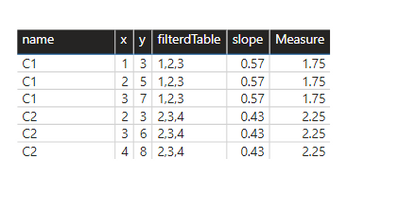
Best Regards,
Jianbo Li
If this post helps, then please consider Accept it as the solution to help the other members find it more quickly.


- Mark as New
- Bookmark
- Subscribe
- Mute
- Subscribe to RSS Feed
- Permalink
- Report Inappropriate Content
@smpa01 You could create a measure that returns a text table using TOCSV and parse that.
For example:
LINEST Output =
VAR _filteredTable_ = FILTER ( ALL ( 'fact' ), 'fact'[Country] = MAX ( 'fact'[Country] ) )
VAR _linEst_ = LINESTX ( _filteredTable_, 'fact'[y], 'fact'[x] )
VAR _toText = TOCSV ( _linEst_, , "|", FALSE() )
RETURN
    _toText
Then you can define the following:
Slope1 = PATHITEM ( [LINEST Output], 1 )ResidualSumOfSquares = PATHITEM ( [LINEST Output], 10 )- Mark as New
- Bookmark
- Subscribe
- Mute
- Subscribe to RSS Feed
- Permalink
- Report Inappropriate Content
Hi @smpa01 ,
Please try:
Measure =
var _a = FILTER(ALL('fact'),'fact'[Country]=MAX('fact'[Country]))
return MAXX(CALCULATETABLE(LINEST('fact'[y],'fact'[x]),_a),[Slope1])
Final output:
Best Regards,
Jianbo Li
If this post helps, then please consider Accept it as the solution to help the other members find it more quickly.
- Mark as New
- Bookmark
- Subscribe
- Mute
- Subscribe to RSS Feed
- Permalink
- Report Inappropriate Content
@v-jianboli-msft just being curious here. So if I need Total Sum of Square, Residual Sum of Square and R Square, I need to create 3 seperate measures (TSS, RSS and RSquare) and then create subsequent measures for each ( incorect TSS, RSS, RSquare) immediately created measures like you did above to derive at the correct TSS, RSS, RSquare value for the filter context?
========================
Did I answer your question? Mark my post as a solution!
Proud to be a Super User
My Custom Visualization Projects
• Plotting Live Sound: Live Sound
• Beautiful News: Women in Parliament, Energy Mix, Shrinking Armies
• Visual Capitalist: Working Hrs
• Others: Easing Graph, Animated Calendar
MayViz Submissions
• Week 1: View
• Week 2: View
• Week 3: View
• Week 4: View
========================


- Mark as New
- Bookmark
- Subscribe
- Mute
- Subscribe to RSS Feed
- Permalink
- Report Inappropriate Content
You have to create different measures, one for each statistic you need. There is currently no way to create a DAX function that returns a table value to be shared by multiple measures.
- Mark as New
- Bookmark
- Subscribe
- Mute
- Subscribe to RSS Feed
- Permalink
- Report Inappropriate Content
@smpa01 You could create a measure that returns a text table using TOCSV and parse that.
For example:
LINEST Output =
VAR _filteredTable_ = FILTER ( ALL ( 'fact' ), 'fact'[Country] = MAX ( 'fact'[Country] ) )
VAR _linEst_ = LINESTX ( _filteredTable_, 'fact'[y], 'fact'[x] )
VAR _toText = TOCSV ( _linEst_, , "|", FALSE() )
RETURN
    _toText
Then you can define the following:
Slope1 = PATHITEM ( [LINEST Output], 1 )ResidualSumOfSquares = PATHITEM ( [LINEST Output], 10 )- Mark as New
- Bookmark
- Subscribe
- Mute
- Subscribe to RSS Feed
- Permalink
- Report Inappropriate Content
Thanks @AlexisOlson , applied here
If a linear regreesion is required but only for viz purpose there are tons (I literally mean tons) of javascript library that can do the job at the front-end while developing cust viz and there won't be any DAX dependency.
However, if the linear regression is required as part of the SSAS dataset then DAX is the only option and this is a really nice trick here.
========================
Did I answer your question? Mark my post as a solution!
Proud to be a Super User
My Custom Visualization Projects
• Plotting Live Sound: Live Sound
• Beautiful News: Women in Parliament, Energy Mix, Shrinking Armies
• Visual Capitalist: Working Hrs
• Others: Easing Graph, Animated Calendar
MayViz Submissions
• Week 1: View
• Week 2: View
• Week 3: View
• Week 4: View
========================

Helpful resources

Fabric Data Days 2026
Don't miss out on Data Days, June 15 through August 7. Learn Fabric, Power BI, SQL, AI and more.

Power BI DataViz World Championships - June 2026
A new Power BI DataViz World Championship is coming this June! Don't miss out on submitting your entry.

| User | Count |
|---|---|
| 23 | |
| 22 | |
| 21 | |
| 18 | |
| 11 |


| User | Count |
|---|---|
| 58 | |
| 55 | |
| 43 | |
| 36 | |
| 35 |


