Join us at FabCon Atlanta from March 16 - 20, 2026, for the ultimate Fabric, Power BI, AI and SQL community-led event. Save $200 with code FABCOMM.
Register now!The Power BI Data Visualization World Championships is back! Get ahead of the game and start preparing now! Learn more
Hello,
I have a Table that contains information about Parent and Child records together (ID, Parent_ID, Type, Gender). I need to add 2 columns that calculate the number of children of each gender for each parent (Boy, Girl) but cannot figure out how to do it.
| ID | Parent_ID | Type | Gender | Boy | Girl |
| 1 | 1 | Parent | 3 | 1 | |
| 2 | 2 | Parent | 2 | 2 | |
| 3 | 1 | Child | Boy | ||
| 4 | 1 | Child | Boy | ||
| 5 | 1 | Child | Boy | ||
| 6 | 1 | Child | Girl | ||
| 7 | 2 | Child | Boy | ||
| 8 | 2 | Child | Boy | ||
| 9 | 2 | Child | Girl | ||
| 10 | 2 | Child | Girl |
Thank you,
Hugues.
Solved! Go to Solution.
Got it @huguest
Here you go
Boy =
IF (
Table1[Type] = "Parent",
CALCULATE (
COUNT ( Table1[Gender] ),
Table1[Gender] = "Boy",
ALLEXCEPT ( Table1, Table1[Parent_ID] )
)
)
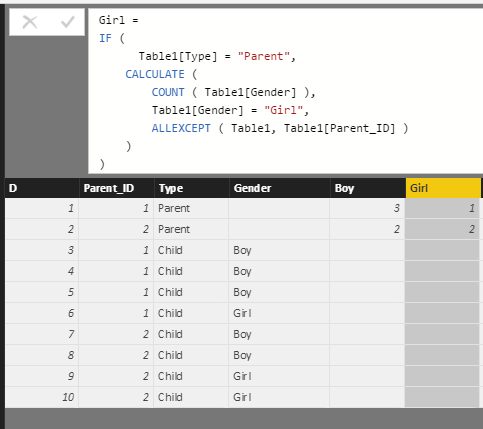
Girl =
IF (
Table1[Type] = "Parent",
CALCULATE (
COUNT ( Table1[Gender] ),
Table1[Gender] = "Girl",
ALLEXCEPT ( Table1, Table1[Parent_ID] )
)
)
)
Do you expect to get the results in the same table in a calculated column, or it's ok to use a measure and see your results like shown below?
| Parent_ID | Boy | Girl |
| 1 | 3 | 1 |
| 2 | 2 | 2 |
N-
Ideally as a calculated column in the same table.
Got it @huguest
Here you go
Boy =
IF (
Table1[Type] = "Parent",
CALCULATE (
COUNT ( Table1[Gender] ),
Table1[Gender] = "Boy",
ALLEXCEPT ( Table1, Table1[Parent_ID] )
)
)
Girl =
IF (
Table1[Type] = "Parent",
CALCULATE (
COUNT ( Table1[Gender] ),
Table1[Gender] = "Girl",
ALLEXCEPT ( Table1, Table1[Parent_ID] )
)
)
)
Thank you, I will give it a try as soon as I get a chance.
Hi, try with this calculated column
Boy =
IF (
Table3[Type] = "Parent",
COUNTROWS (
FILTER (
Table3,
Table3[Parent_ID] = EARLIER ( Table3[Parent_ID] )
&& Table3[Gender] = "Boy"
)
)
)Regards
Victor
Lima - Peru
The Power BI Data Visualization World Championships is back! Get ahead of the game and start preparing now!
| User | Count |
|---|---|
| 38 | |
| 36 | |
| 33 | |
| 30 | |
| 28 |
| User | Count |
|---|---|
| 127 | |
| 88 | |
| 78 | |
| 66 | |
| 65 |