Get certified for free when you join Fabric Data Days 2026 and dive into Fabric, Power BI, SQL, AI, and other essential data skills.
Join nowJuly 7 - July 17 | Round 2 of the Power BI Dataviz World Championships. Don't miss your chance! Learn more
Hi!,
I've found the following issue with ALLEXCEPT function:
My formula ---> Valores CIIU =
VAR ValoresCIIU = CALCULATE( [Semana Valores], ALLEXCEPT( CIIU, CIIU[id_clase] ) )
RETURN
ValoresCIIU
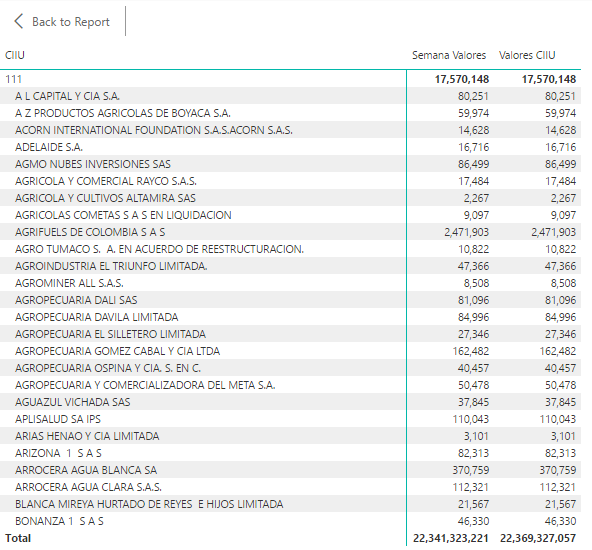
This formula does not work as I expect it should. The result is the same to my [Semana Valores]
measure and when I put it in a matrix for see the result, as you can see, both formulas do the same, so ALLEXCEPT is not working. I want the formula show me the CIIU result (in table would be the 111 value or 17,570,148) for every row of every company that belongs to its respective CIIU. Here is my pbix file if it would be needed. https://1drv.ms/u/s!AtTnrgPUQzQCkFc5l7kMeLoe7z9X
Thanks a lot!
In your scenario, your CIIU[id_clase] and [Empresa] fields are from different table. These two fields have no direct relationship. So when you put both feilds into matrix and drill down into one level, it can't make the calculation group on CIIU[id_clase] with ALLEXCEPT().
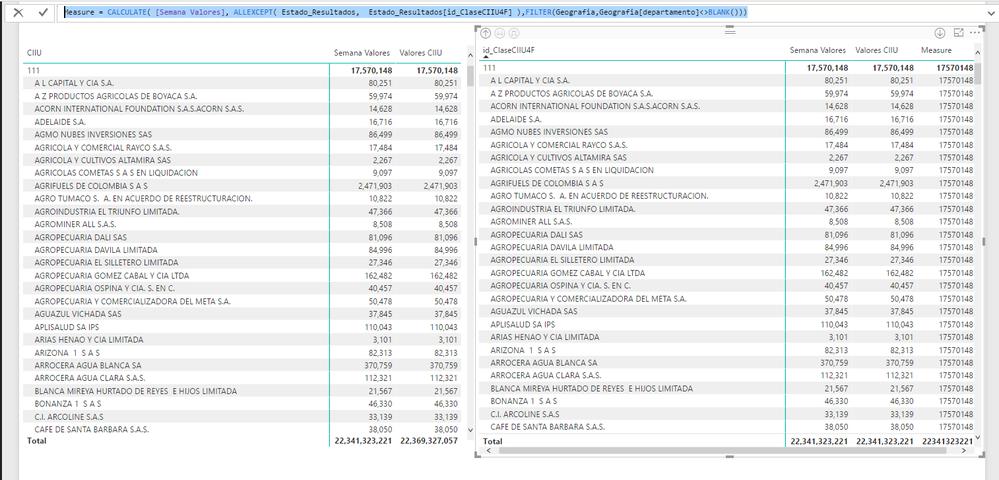
Their "relationship" is actually described in your fact table "Estado_Resultados". So you should put Estado_Resultados[id_ClaseCIIU4F] into matrix and ALLEXCEPT() on this column. But I still can't figure out why the measure can't take your report filter "departmentno <> BLANK()". So I hard code the filter into the measure:
Measure = CALCULATE( [Semana Valores], ALLEXCEPT( Estado_Resultados, Estado_Resultados[id_ClaseCIIU4F] ),FILTER(Geografia,Geografia[departamento]<>BLANK()))
Thank you very much for your response. It seems like it works like I want, but the problem is it does not work for me if the ALLEXCEPT filter come from the main table Estado_Resultados, because the filters I need for ALLEXCEPT are in CIIU table. Is there a way to do that? I mean use the CIIU table as an argument of ALLEXCEPT, I saw examples in power bi pages where it could be donde. What I am doing wrong?
Thanks again for your answer.
Join us in Barcelona for FabCon and SQLCon, the Fabric, Power BI, SQL, and AI community event. Save €200 with code FABCMTY200.
Check out the July 2026 Power BI update to learn about new features.
Join Data Days 2026: 60 days of free live/on-demand sessions, challenges, study groups, and certification opportunities.
| User | Count |
|---|---|
| 30 | |
| 25 | |
| 23 | |
| 22 | |
| 13 |
| User | Count |
|---|---|
| 50 | |
| 32 | |
| 19 | |
| 19 | |
| 17 |