Join us at FabCon Atlanta from March 16 - 20, 2026, for the ultimate Fabric, Power BI, AI and SQL community-led event. Save $200 with code FABCOMM.
Register now!The Power BI Data Visualization World Championships is back! It's time to submit your entry. Live now!
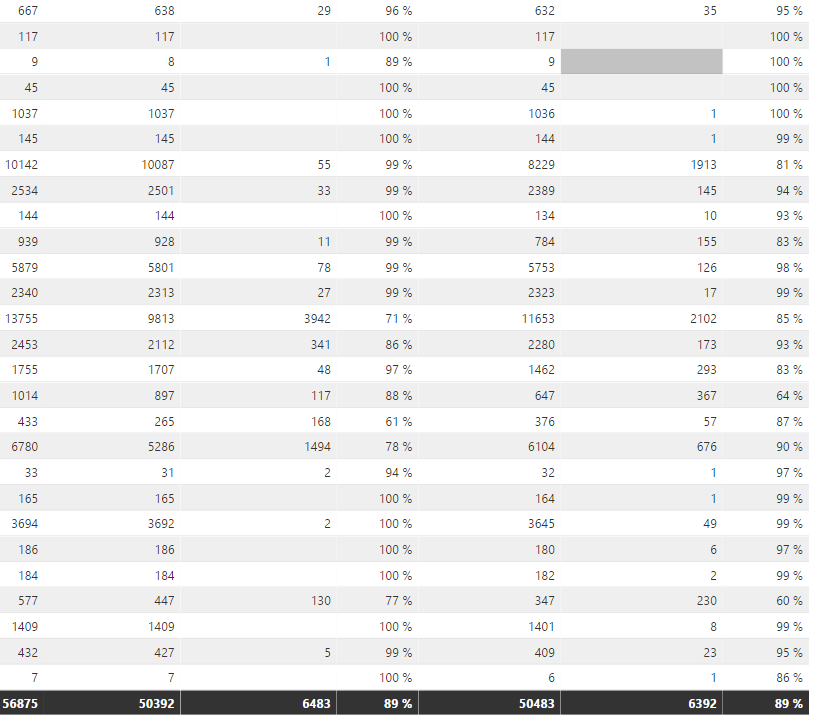
If it is greater than 90%, i want to display in green color. if it is between 80 to 90%, i want to display in amber color. please help me on this.
Hi @kalpanaV,
Currently, it is not supported to specify different colors for each category, in other words, set row color based on specific value.
Regards,
Yuliana Gu
Have you tried a Confitional Formatting: (In the most recent Power BI Dekstop version, you have to pick 'Color Scales' after Conditional Formatting, but the rest of this document should help?)
https://powerbi.microsoft.com/en-us/documentation/powerbi-desktop-conditional-table-formatting/
Proud to give back to the community!
Thank You!
Hi
Thank you, i read this document. but the thing is , i want to mention greater than or less than in numbers.. ie particular no i want to give.
What i want is
if it is greater than 95%, it should be in green color.
if it is between 85% to 95%,it should be in amber color.
if it is below 85%, it should be in red color.
Hi @kalpanaV,
I can understand your requirement. You want to set the background of cell or row conditionally based on percentage value, right? Unfortunately, this is not supported now.
Regards,
Yuliana Gu
The Power BI Data Visualization World Championships is back! It's time to submit your entry.
Check out the January 2026 Power BI update to learn about new features.
| User | Count |
|---|---|
| 56 | |
| 42 | |
| 40 | |
| 21 | |
| 20 |
| User | Count |
|---|---|
| 142 | |
| 105 | |
| 63 | |
| 36 | |
| 35 |