Get Fabric or SQL Certified for Free.
Get certified for free when you join Fabric Data Days 2026 and dive into Fabric, Power BI, SQL, AI, and other essential data skills.
Join now- Power BI forums
- Get Help with Power BI
- Desktop
- Service
- Report Server
- Power Query
- Mobile Apps
- Developer
- DAX Commands and Tips
- Custom Visuals Development Discussion
- Health and Life Sciences
- Power BI Spanish forums
- Translated Spanish Desktop
- Training and Consulting
- Instructor Led Training
- Dashboard in a Day for Women, by Women
- Galleries
- Data Stories Gallery
- Themes Gallery
- Contests Gallery
- QuickViz Gallery
- Quick Measures Gallery
- Visual Calculations Gallery
- Fabric Apps Gallery
- Notebook Gallery
- Translytical Task Flow Gallery
- TMDL Gallery
- R Script Showcase
- Webinars and Video Gallery
- Ideas
- Custom Visuals Ideas (read-only)
- Issues
- Issues
- Events
- Upcoming Events
July 7 - July 17 | Round 2 of the Power BI Dataviz World Championships. Don't miss your chance! Learn more
- Power BI forums
- Forums
- Get Help with Power BI
- Desktop
- Re: KPI Visu@alization font issue
- Subscribe to RSS Feed
- Mark Topic as New
- Mark Topic as Read
- Float this Topic for Current User
- Bookmark
- Subscribe
- Printer Friendly Page


- Mark as New
- Bookmark
- Subscribe
- Mute
- Subscribe to RSS Feed
- Permalink
- Report Inappropriate Content
KPI Visualization font issue
Hi all!
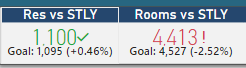
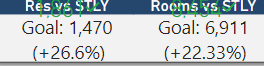
with the latest update, there seems to be an issue with the KPI visualization once published to the web. In the desktop version, i have formatted the font for the indicator, however once online, it seems like all of my changes are disregarded. This is causing an issue across multiple reports. I have tried editing the report in the web version and nothing seems to change. I have also attempted republishing, as well as creating a new report and formatting the KPI visualization the same and still end up with the same results. Something changed within the past week or so, prior to whatever changed, the desktop version and the web version looked exactly the same.
This is the visualization from the desktop version
This is the visualization from the web version.
Any assistance would be greatly appreciated.
Solved! Go to Solution.
- Mark as New
- Bookmark
- Subscribe
- Mute
- Subscribe to RSS Feed
- Permalink
- Report Inappropriate Content
HI @jawilson808 ,
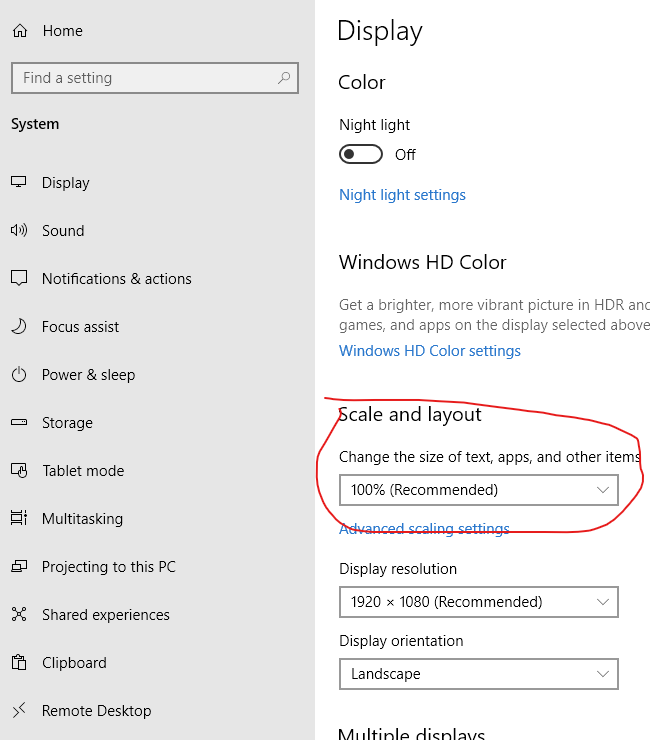
Have you enabled on 'scale' properly on your device? It may affect the layout and visual render on power bi service.
Regards,
Xiaoxin Sheng

- Mark as New
- Bookmark
- Subscribe
- Mute
- Subscribe to RSS Feed
- Permalink
- Report Inappropriate Content
HI @jawilson808 ,
It will help if you provide more detailed information to help us clarify your scenario. (e.g. web browser type and version, power bi service region, system version...)
How to Get Your Question Answered Quickly
In addition, are there any specific fonts you set in KPI visual style? Can you please share the pbix file for test?
Notice: do mask on sensitive data before share.
Regards,
Xiaoxin Sheng
- Mark as New
- Bookmark
- Subscribe
- Mute
- Subscribe to RSS Feed
- Permalink
- Report Inappropriate Content
Hi @Anonymous !
Thank you for your reply. I am using chrome Version 78.0.3904.108 (Official Build) (64-bit), and have also used Edge with the KPI showing the same way. My desktop version of Power BI is 2.75.5649.861 64-bit (November 2019) and I am in North America.
As far as the font, I kept everything default with the exception of the indicator font size. I only changed this to a smaller font. I have created a sample pbix file for review. https://www.dropbox.com/s/2ywvqtwhjn4tdkn/sample%20kpi.pbix?dl=0
Thank you again.
- Mark as New
- Bookmark
- Subscribe
- Mute
- Subscribe to RSS Feed
- Permalink
- Report Inappropriate Content
HI @jawilson808 ,
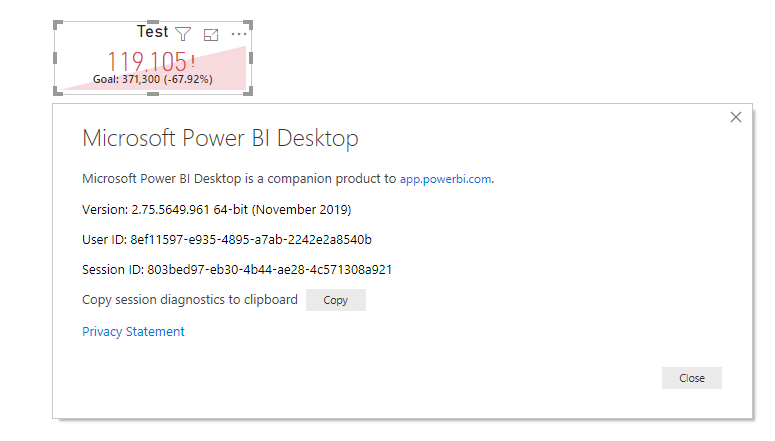
Unfortunately, I can't reproduce this on my side. Maybe you can open a support ticket to get further support from power bi team.
Below are testing result snapshots. (web browser: google chrome ,version 78.0.3904.108 (Official Build) 64-bit)

Regards,
Xiaoxin Sheng
- Mark as New
- Bookmark
- Subscribe
- Mute
- Subscribe to RSS Feed
- Permalink
- Report Inappropriate Content
Hi @Anonymous! Thank you you for getting back to me.
perhaps I'm not explaning properly. When you go to resize the entire KPI visualization on the web to a smaller size, you will notice that as you do so, the goal and title begins to overalap with the indicator value. However, within the desktop version, the title and goals adjust accordingly with the indicator.
- Mark as New
- Bookmark
- Subscribe
- Mute
- Subscribe to RSS Feed
- Permalink
- Report Inappropriate Content
HI @jawilson808 ,
Have you enabled on 'scale' properly on your device? It may affect the layout and visual render on power bi service.
Regards,
Xiaoxin Sheng


- Mark as New
- Bookmark
- Subscribe
- Mute
- Subscribe to RSS Feed
- Permalink
- Report Inappropriate Content
Hi @jawilson808 ,
DO you have any Bookmark created on your report? If yes so please update that bookmark whenever you make any changes.
Feel free to give Thumps up and mark it as a solution if it helps you!
Please take a quick glance at newly created dashboards : Restaurant Management Dashboard , HR Analytics Report , Hotel Management Report, Sales Analysis Report , Fortune 500 Companies Analysis , Revenue Tracking Dashboard
- Mark as New
- Bookmark
- Subscribe
- Mute
- Subscribe to RSS Feed
- Permalink
- Report Inappropriate Content
Helpful resources

FabCon & SQLCon – Barcelona 2026
Join us in Barcelona for FabCon and SQLCon, the Fabric, Power BI, SQL, and AI community event. Save €200 with code FABCMTY200.

Data Days 2026
Join Data Days 2026: 60 days of free live/on-demand sessions, challenges, study groups, and certification opportunities.

Power BI DataViz World Championships - June 2026
A new Power BI DataViz World Championship is coming this June! Don't miss out on submitting your entry.

| User | Count |
|---|---|
| 29 | |
| 28 | |
| 27 | |
| 27 | |
| 19 |


| User | Count |
|---|---|
| 56 | |
| 47 | |
| 39 | |
| 28 | |
| 21 |


