Join us at FabCon Atlanta from March 16 - 20, 2026, for the ultimate Fabric, Power BI, AI and SQL community-led event. Save $200 with code FABCOMM.
Register now!The Power BI Data Visualization World Championships is back! Get ahead of the game and start preparing now! Learn more
Hi all,
I am using the KPI visual for the 1st time and I am wanting to add a calculated target, but I can't get it to work.
My dataset has a column that contains values (TimeToFill) like so (data not real):
| Date | MonthYear | TimeToFill |
| 1/01/2022 | Jan 2022 | 25.02 |
| 02/02/2022 | Jan 2022 | 28.32 |
| 01/03/2022 | Mar 2022 | 31.89 |
| 20/05/2022 | May 2022 | 18.29 |
The Value in the KPI visual is an average of the TimeToFill values. With the Trend Axis being the MonthYear.
For the Target value, I have written the following expression:
TimeToFill-Target =
VAR StartDate = EOMONTH(TODAY(),-14)+1
VAR EndDate = EOMONTH(TODAY(),-1)
VAR Result =
Calculate(
AVERAGE(fact_PageUpReqData[TimeToFill-OfferAccepted]),
DATESBETWEEN( fact_PageUpReqData[dim_FirstOfferAccepted.FirstOfferAccepted], StartDate, EndDate )
)
RETURN
Result
But this is giving me the same result as the KPI card.
What I am wanting the target to show, is the average TimeToFill over the last 13 months. Not what it was for the last month as it is currently.
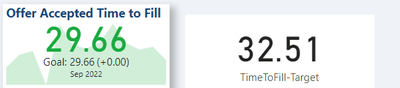
How do I achieve this?
Thanks
Carl
Solved! Go to Solution.
Solved it 🙂 needed to all the ALL function in.
TimeToFill-Target =
VAR StartDate = EOMONTH(TODAY(),-14)+1
VAR EndDate = EOMONTH(TODAY(),-1)
VAR Result =
Calculate(
AVERAGE(fact_PageUpReqData[TimeToFill-OfferAccepted]),
DATESBETWEEN( fact_PageUpReqData[dim_FirstOfferAccepted.FirstOfferAccepted], StartDate, EndDate ),
ALL(fact_PageUpReqData)
)
RETURN
ResultSolved it 🙂 needed to all the ALL function in.
TimeToFill-Target =
VAR StartDate = EOMONTH(TODAY(),-14)+1
VAR EndDate = EOMONTH(TODAY(),-1)
VAR Result =
Calculate(
AVERAGE(fact_PageUpReqData[TimeToFill-OfferAccepted]),
DATESBETWEEN( fact_PageUpReqData[dim_FirstOfferAccepted.FirstOfferAccepted], StartDate, EndDate ),
ALL(fact_PageUpReqData)
)
RETURN
ResultThe Power BI Data Visualization World Championships is back! Get ahead of the game and start preparing now!
| User | Count |
|---|---|
| 39 | |
| 35 | |
| 34 | |
| 32 | |
| 27 |
| User | Count |
|---|---|
| 136 | |
| 96 | |
| 77 | |
| 67 | |
| 65 |