Don't miss your chance to take exam DP-600 or DP-700 on us!
Request nowLearn from the best! Meet the four finalists headed to the FINALS of the Power BI Dataviz World Championships! Register now
Hi,
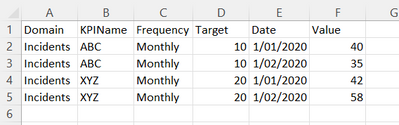
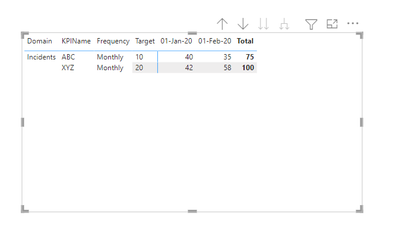
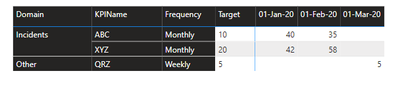
I want to create a KPI report in a table format (image attached). I have created measures for each month but how can I place this in the below format. Any idea? Thanks.
Solved! Go to Solution.
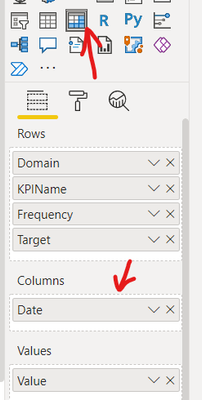
If you transform your data to this format in Power Query you can use the Date Field in a Matrix
Expand all down the hierarchy
Proud to be a Super User!
If you transform your data to this format in Power Query you can use the Date Field in a Matrix
Expand all down the hierarchy
Proud to be a Super User!
There's a KPI Matrix visual in AppSource you could achieve a similar outcome only the historical data would be displayed in a sparkline which you can click on and expand to get the details.
You can download a sample workbook here:
Find the right app | Microsoft AppSource
Proud to be a Super User!
@jk_adelaide , You hybrid table, not supported as of now, But refer to these workarounds
if you are looking for a Hybrid display with Matrix Column and measure
https://community.powerbi.com/t5/Community-Blog/Creating-a-custom-or-hybrid-matrix-in-PowerBI/ba-p/1...
https://community.powerbi.com/t5/Quick-Measures-Gallery/The-New-Hotness-Custom-Matrix-Hierarchy/m-p/...
vote for Hybrid Table
https://ideas.powerbi.com/ideas/idea/?ideaid=9bc32b23-1eb1-4e74-8b34-349887b37ebc
Share feedback directly with Fabric product managers, participate in targeted research studies and influence the Fabric roadmap.
Check out the February 2026 Power BI update to learn about new features.
| User | Count |
|---|---|
| 54 | |
| 47 | |
| 39 | |
| 16 | |
| 15 |
| User | Count |
|---|---|
| 83 | |
| 70 | |
| 38 | |
| 28 | |
| 26 |