cancel
Showing results for 
Search instead for 
Did you mean: 

The Power BI Data Visualization World Championships is back! Get ahead of the game and start preparing now! Learn more

Reply
Basil2023
New Member

KPI Donut Chart

Hi There, 


Im new to PowerBI and looking for some help with PayPal KPI Donut ChartI am trying to link multiple tables of the same field into the KPI Donut Chart and then filter by Year slicer.


The KPI Donut chart doesnt seem to allow me to assign multiple tables by dragging in the normal way. It only shows 1 field from 1 table. I do seem to have linked the year slicer to the Donut Chart though.


The Year slicer is reading from an appended table of Year values from each table, leaving only 3 options; 2021, 2022, 2023


The result is that the chart shows values for Survey 2021 only and doesnt change when I click on 2022, 2023 values in the Year slicer. I would like the donut chart to show different values per year.


Capture1.JPG


Tree structure showing each table linked by Employee Name in both directionsTree structure showing each table linked by Employee Name in both directionsAny help much appreciated.


Basil2023

1 ACCEPTED SOLUTION
Anonymous
Not applicable

Hi @Basil2023 ,

Please try below steps:

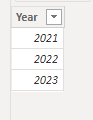
1. below is my test table

Table:

vbinbinyumsft_1-1673836656675.png

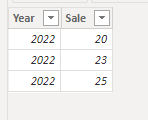
Table1:

vbinbinyumsft_2-1673836672229.png

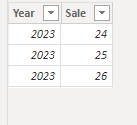
Table2:

vbinbinyumsft_3-1673836721158.png

Table3:

vbinbinyumsft_4-1673836737817.png

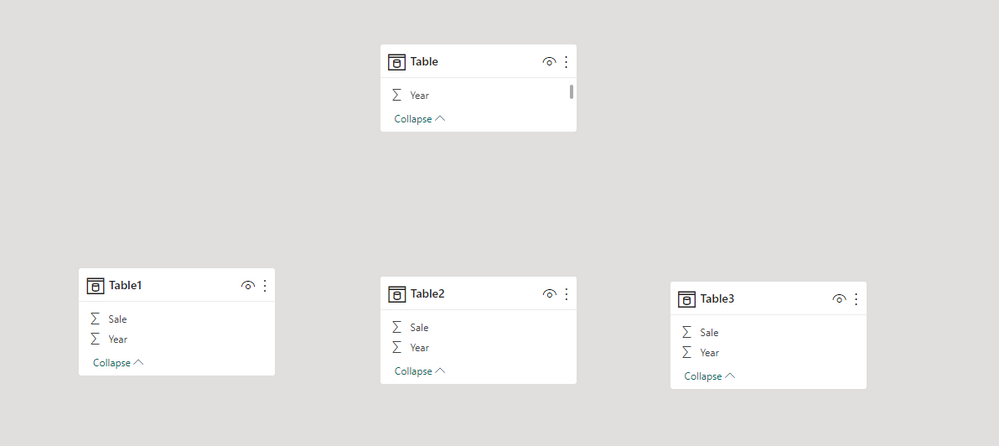
Model:

vbinbinyumsft_0-1673836593877.png


2. create a measure with below dax formula

Measure =
VAR target = 80
VAR cur_year =
    SELECTEDVALUE ( 'Table'[Year] )
VAR tmp =
    UNION ( Table1, Table2, Table3 )
VAR tmp1 =
    FILTER ( tmp, [Year] = cur_year )
VAR _val =
    SUMX ( tmp1, [Sale] )
RETURN
    DIVIDE ( _val, target )

3. add a  visual with this measure and add a slicer with "Table[Year]" field

vbinbinyumsft_5-1673836844902.png

Please refer the attached .pbix file.


Best regards,
Community Support Team_Binbin Yu
If this post helps, then please consider Accept it as the solution to help the other members find it more quickly.

View solution in original post

2 REPLIES 2
Anonymous
Not applicable

Hi @Basil2023 ,

Please try below steps:

1. below is my test table

Table:

vbinbinyumsft_1-1673836656675.png

Table1:

vbinbinyumsft_2-1673836672229.png

Table2:

vbinbinyumsft_3-1673836721158.png

Table3:

vbinbinyumsft_4-1673836737817.png

Model:

vbinbinyumsft_0-1673836593877.png


2. create a measure with below dax formula

Measure =
VAR target = 80
VAR cur_year =
    SELECTEDVALUE ( 'Table'[Year] )
VAR tmp =
    UNION ( Table1, Table2, Table3 )
VAR tmp1 =
    FILTER ( tmp, [Year] = cur_year )
VAR _val =
    SUMX ( tmp1, [Sale] )
RETURN
    DIVIDE ( _val, target )

3. add a  visual with this measure and add a slicer with "Table[Year]" field

vbinbinyumsft_5-1673836844902.png

Please refer the attached .pbix file.


Best regards,
Community Support Team_Binbin Yu
If this post helps, then please consider Accept it as the solution to help the other members find it more quickly.

RemyO
Resolver I
Resolver I

Cant you union the 3 tables into in 1 table ? 

Helpful resources

Announcements
Power BI DataViz World Championships

Power BI Dataviz World Championships

The Power BI Data Visualization World Championships is back! Get ahead of the game and start preparing now!

December 2025 Power BI Update Carousel

Power BI Monthly Update - December 2025

Check out the December 2025 Power BI Holiday Recap!

FabCon Atlanta 2026 carousel

FabCon Atlanta 2026

Join us at FabCon Atlanta, March 16-20, for the ultimate Fabric, Power BI, AI and SQL community-led event. Save $200 with code FABCOMM.