
Learn from the best! Meet the four finalists headed to the FINALS of the Power BI Dataviz World Championships! Register now
Hello, I am building a visuilization for our company KPI's. They are in units, dollars, and percentages depending on the KPI.
I have been working through various structures to get to the solution. I have tried one table with goals and actuals by month then transformed in data editor by unpivoting the month columns but since they are in dollars, units, and percentages figured out I can't do that because the value field has to be the same type for all the values.
| Dollar KPI Goal | Jan-17 | Feb-17 | Mar-17 | Apr-17 | May-17 | Jun-17 | Jul-17 | Aug-17 | Sep-17 | Oct-17 | Nov-17 | Dec-17 |
| KPI1 Work Orders | 3 | 3 | 3 | 3 | 3 | 3 | ||||||
| KPI2 Sales | $9 | $12 | $3 | |||||||||
| KPI3 % Completed | 5% | 10% | 15% | 20% | 25% | 30% | 35% | 40% | 75% | 85% | 90% | 100% |
| Dollar KPI Actual | Jan-17 | Feb-17 | Mar-17 | Apr-17 | May-17 | Jun-17 | Jul-17 | Aug-17 | Sep-17 | Oct-17 | Nov-17 | Dec-17 |
| KPI1 Orders | 3 | 2 | 1 | 4 | 3 | 5 | ||||||
| KPI2 Sales | $9 | $10 | $6 | |||||||||
| KPI3 % Completed | 10% | 15% | 15% | 15% | 20% | 40% |
Then I tried to create a table for each KPI but that left me with a mess of fields. Ideally I would like to pull in the KPI list, Goal and Value into the visuilization and filter on just the KPI I want. Any suggestions?
Thanks
Solved! Go to Solution.
Hi @jpt1228,
Based on my test, you should be able to follow steps below to unpivot your tables to different columns for each KPI like below.
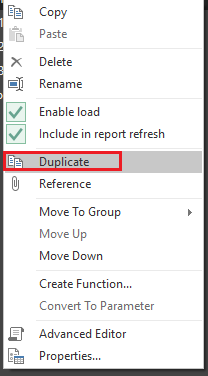
1. Duplicate your original table in Query Editor.
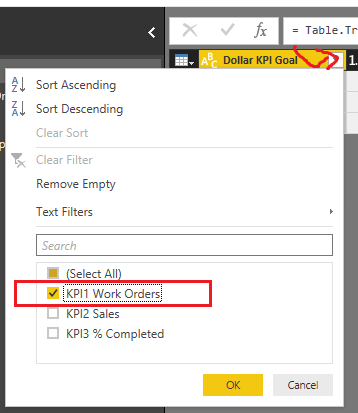
2. Filter the "Dollar KPI Goal" column on the duplicated table, and only keep rows for "KPI1 Work Orders".
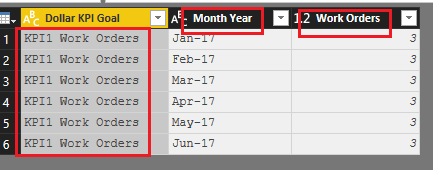
3. Unpivot the table, rename "Attribute" column to "Month Year", "Value" column to "Work Orders"
4. Repeat all three steps above for "KPI2 Sales" and "KPI3 % Completed".
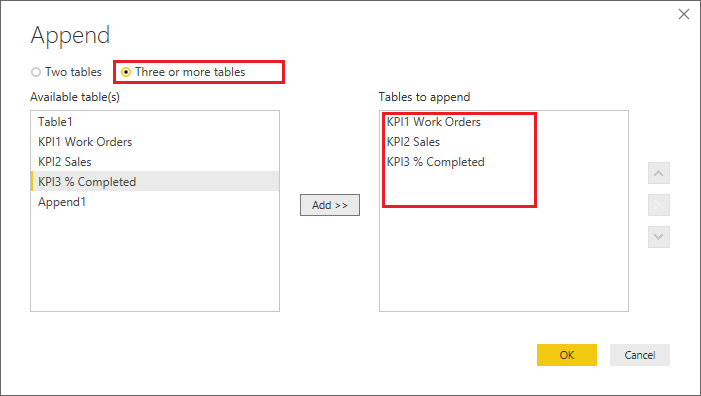
5. Use 'Append Queries' option to append all the three unpivoted tables to a single table.
Regards
Hi @jpt1228,
Based on my test, you should be able to follow steps below to unpivot your tables to different columns for each KPI like below.
1. Duplicate your original table in Query Editor.
2. Filter the "Dollar KPI Goal" column on the duplicated table, and only keep rows for "KPI1 Work Orders".
3. Unpivot the table, rename "Attribute" column to "Month Year", "Value" column to "Work Orders"
4. Repeat all three steps above for "KPI2 Sales" and "KPI3 % Completed".
5. Use 'Append Queries' option to append all the three unpivoted tables to a single table.
Regards
If you have recently started exploring Fabric, we'd love to hear how it's going. Your feedback can help with product improvements.
A new Power BI DataViz World Championship is coming this June! Don't miss out on submitting your entry.
Share feedback directly with Fabric product managers, participate in targeted research studies and influence the Fabric roadmap.
| User | Count |
|---|---|
| 57 | |
| 34 | |
| 33 | |
| 18 | |
| 16 |
| User | Count |
|---|---|
| 65 | |
| 65 | |
| 44 | |
| 30 | |
| 29 |