Join us at FabCon Atlanta from March 16 - 20, 2026, for the ultimate Fabric, Power BI, AI and SQL community-led event. Save $200 with code FABCOMM.
Register now!The Power BI Data Visualization World Championships is back! Get ahead of the game and start preparing now! Learn more
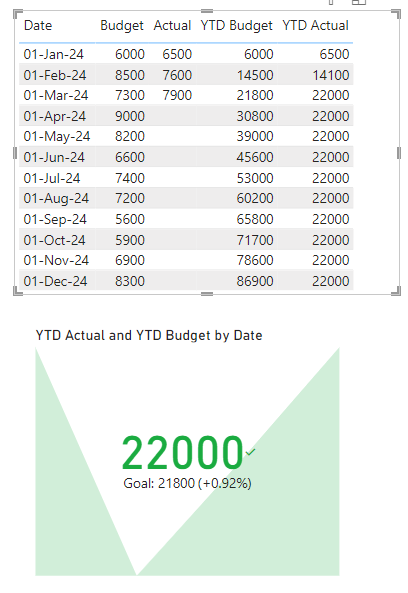
I am trying to display a KPI card that compares the Year to Date Actual Revenue versus Year to Date Budget Revenue.
I have a column for Actuals that is populated each month and is currently populated for the first 3 monthes of the year. For the Budget my column has all 12 monthes populated with the budget for each month of 2024.
I have tried the following and neither have worked:
Sum of Actual in the "Value"
Year or Month from the calendar table in Trend Axis
YTD measure for Budget in Target
or
YTD measure for Actual in Value
Year or Month from the calendar table in Trend Axis
YTD measure for Budget in Target
I end up getting a display of the year to date Actuals ( which is the correct value) but the Goal keeps displaying a total of 11 months of the year and showing red. Also the backround doesn't show up when I use the measures instead of the sum of's. When looking at the actual data we should be in the green and beating our target/budget How do I properly program this KPI Card?
Solved! Go to Solution.
Hi @M-Beans
Download PBIX file with the example below
Create a table with this DAX
Dates_ = DATESBETWEEN('Dates'[Date], MIN('DataTable'[Date]), EOMONTH(TODAY(),-1))
Use the date column in that table as the Trend Axis for the KPI.
You will need also need a Date Table and all 3 tables need to be related by the Date field.
Regards
Phil
Proud to be a Super User!
Thanks for your help!
Hi @M-Beans
Download PBIX file with the example below
Create a table with this DAX
Dates_ = DATESBETWEEN('Dates'[Date], MIN('DataTable'[Date]), EOMONTH(TODAY(),-1))
Use the date column in that table as the Trend Axis for the KPI.
You will need also need a Date Table and all 3 tables need to be related by the Date field.
Regards
Phil
Proud to be a Super User!
The Power BI Data Visualization World Championships is back! Get ahead of the game and start preparing now!
| User | Count |
|---|---|
| 40 | |
| 35 | |
| 34 | |
| 31 | |
| 28 |
| User | Count |
|---|---|
| 137 | |
| 102 | |
| 71 | |
| 67 | |
| 65 |