Share feedback directly with Fabric product managers, participate in targeted research studies and influence the Fabric roadmap.
Sign up nowGet Fabric certified for FREE! Don't miss your chance! Learn more
Hi there,
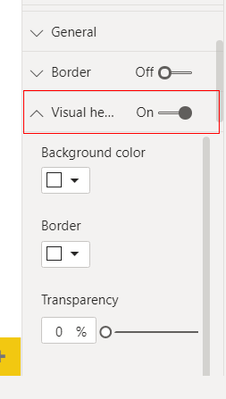
Is there a way to control with JSON theme file what will be default option in visual header?
I am interested to see only "Focus mode icon"
So as desired outcome i would like to see this for each new visual i put on report
Solved! Go to Solution.
@Anonymous
You may take a look at the post below.
https://community.powerbi.com/t5/Desktop/Report-Theme-font-color-relative-slicer/td-p/768340
Hi !
You can either hide the [Visual Header] completely or it will be available throughout. Curretly it's not possible to only show [Focus Mode] option & hide other options.
Regards,
Thanks for prompt reply. Do you maybe know where i can find some info regarding this. eg which setting is supported to be changed via JSON and which is not?
I would like to close to the topic so i can incorporate this in my company as soon as it becomes avaialble.
@Anonymous
You may take a look at the post below.
https://community.powerbi.com/t5/Desktop/Report-Theme-font-color-relative-slicer/td-p/768340
If there is anyone with same request, this will help
{
"name":"Test",
"visualStyles":{
"*":{
"*":{
"visualHeader":[
{
"show":true,
"showFilterRestatementButton":false,
"showOptionsMenu":false,
"showSeeDataLayoutToggleButton":false,
"showPinButton":false,
"showDrillDownExpandButton":false,
"showDrillDownLevelButton":false,
"showDrillToggleButton":false,
"showDrillUpButton":false,
"showDrillRoleSelector":false,
"showVisualErrorButton":false,
"showVisualWarningButton":false,
"showVisualInformationButton":false
}
]
}
}
}
}
This is the correct response to the original question. I will also add you can adjust the focus mode button with the following attribute
"showFocusModeButton":false
Share feedback directly with Fabric product managers, participate in targeted research studies and influence the Fabric roadmap.
| User | Count |
|---|---|
| 68 | |
| 59 | |
| 44 | |
| 19 | |
| 15 |
| User | Count |
|---|---|
| 108 | |
| 105 | |
| 37 | |
| 26 | |
| 26 |