Don't miss your chance to take the Fabric Data Engineer (DP-600) exam for FREE! Find out how by watching the DP-600 session on-demand now through April 28th.
Learn moreJoin the FabCon + SQLCon recap series. Up next: Power BI, Real-Time Intelligence, IQ and AI, and Data Factory take center stage. All sessions are available on-demand after the live show. Register now
Dear All,
I am trying to connect to MySQL DB via GetData -> More -> Databases -> MySQL database option.
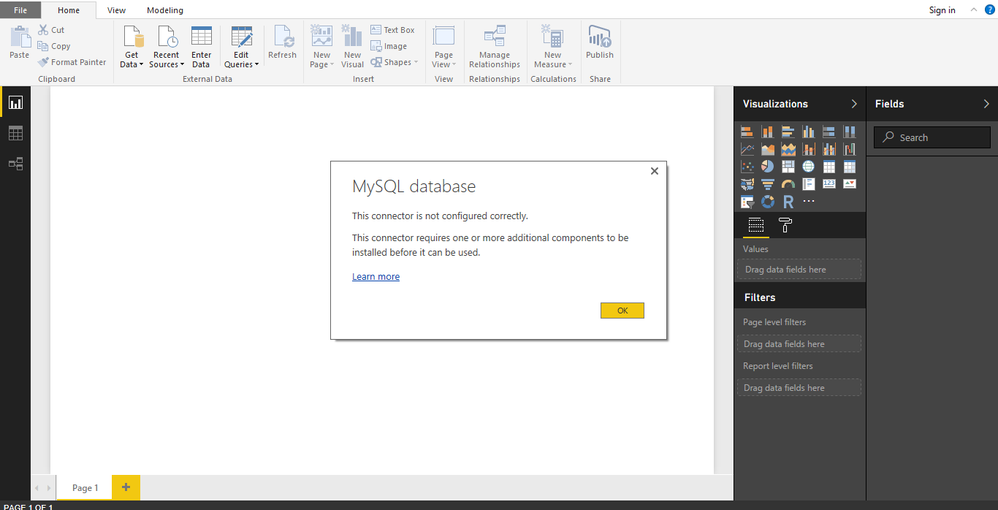
The moment I click on it I get below error:
Now when I click on Learn more , I am redirected to http://dev.mysql.com/downloads/file/?id=412152
I have already installed this, but no change in error.
I tried similar issue with MS Excecl 2016, installed the same software and then edited machine.config file following this link : https://bugs.mysql.com/bug.php?id=70676 and it started working.
I tried finding a similar solution for Power BI, but I am unable to.
Please guide.
--
Regards
SAurabha J
Hi @sau6402,
Here is a similar thread in which a workaround that (download MySQL server and tools here and install it on the desktop you are using Power BI Desktop on) is mentioned. Could you go to check if it helps.![]()
PS: When first using MySQL with Power BI Desktop, I also got the same issue as yours. I just installed mysql-connector-net-6.6.5.msi from that link, then the issue got resolved. Don't know why it doesn't work for you.
Regards
Check out the April 2026 Power BI update to learn about new features.
If you have recently started exploring Fabric, we'd love to hear how it's going. Your feedback can help with product improvements.
A new Power BI DataViz World Championship is coming this June! Don't miss out on submitting your entry.
| User | Count |
|---|---|
| 45 | |
| 38 | |
| 34 | |
| 21 | |
| 17 |
| User | Count |
|---|---|
| 66 | |
| 65 | |
| 31 | |
| 26 | |
| 26 |