cancel
Showing results for 
Search instead for 
Did you mean: 

We've captured the moments from FabCon & SQLCon that everyone is talking about, and we are bringing them to the community, live and on-demand. Starts on April 14th. Register now

Reply
samihuq
Helper III
Helper III

Issue with Oracle Connectivity

Hi,

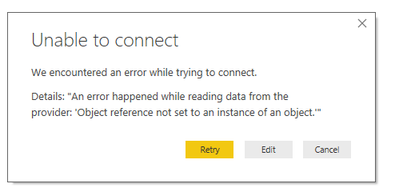
Up untill yesterday i could import data from Oracle Database. Last day i downlaoded the new PowerBI Desktop Update and since then i am receiving the bellow error everytime i am trying to connect.


Details: "An error happened while reading data from the provider: 'Object reference not set to an instance of an object.'"


Note: I am now connecting PowerBI from a different pc that has previous build, currently afraid of upgraing it, please advice as we are trying to go for production this week!!


Warm Regards,

Sami

6 REPLIES 6
Anonymous
Not applicable

I am having this same issue.PowerBIOracleError.png


I can reproduce this issue which seems like a permission issue to the oracle drivers via the Power BI Desktop client. If I change the permission of the application/folders it resolves this issue. However, I do not know how to correctly fix this permission problem without breaking the windows store Power BI App. 


I aslo, tried to debug the exe in visual studio, when I run the app in debug mode it doesn't have the issue.  I hope Microsft will fix this issue.


Thanks in advance!

v-qiuyu-msft
Community Support
Community Support

Hi @samihuq,


Please verify you have installed the Oracle client software properly according to this article: Installing the Oracle client.


Also you can check this similar thread: PowerBI desktop 64Bit oracle connection error Object reference not set to an instance of an object.


Best Regards,
Qiuyun Yu

Community Support Team _ Qiuyun Yu
If this post helps, then please consider Accept it as the solution to help the other members find it more quickly.
Anonymous
Not applicable

Should I go ahead with a ticket on this issue? I haven't seen a response.

Sorry for belated responds. Please go ahead and close the ticket as i have moved away from Oracle Database to SQL Server.

Hi! How did you change the permissions to get this work? I have the same issue, where I installed ODAC into an existing client_1 as I have set up a test environment of Oracle database, and OBIEE Oracle BI, I had already another istance.


I have seen other threads about this error message saying it is mixing of 32 bit and 64 bit clients.

Anonymous
Not applicable

I had the same issue, Restarting Power BI to run as administrator resolves the issue.

Helpful resources

Announcements
New to Fabric survey Carousel

New to Fabric Survey

If you have recently started exploring Fabric, we'd love to hear how it's going. Your feedback can help with product improvements.

Power BI DataViz World Championships carousel

Power BI DataViz World Championships - June 2026

A new Power BI DataViz World Championship is coming this June! Don't miss out on submitting your entry.

Join our Fabric User Panel

Join our Fabric User Panel

Share feedback directly with Fabric product managers, participate in targeted research studies and influence the Fabric roadmap.

March Power BI Update Carousel

Power BI Community Update - March 2026

Check out the March 2026 Power BI update to learn about new features.