cancel
Showing results for 
Search instead for 
Did you mean: 

Data Days is here! Join us now for 60+ days of learning, challenges, and connection. Learn more

Reply
gauravnarchal
Post Prodigy
Post Prodigy

Issue with Measure - Row total

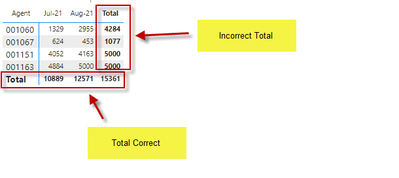
Hello - I have created the below measure in which row total is not showing correctly. How can i fix this issue?


Sale = Sumx(Values(Table[ID]) ,  CALCULATE(IF([Gross Amount]<7000,0,IF([Gross Amount]>100001,5000,([Gross Amount]*.05)))) )


gauravnarchal_1-1641284222860.png


1 ACCEPTED SOLUTION
v-chenwuz-msft
Community Support
Community Support

Hi @gauravnarchal ,


There are some errors in your code that are causing power bi to not recognize the filters you want correctly.

Maybe you can try this code:

Sale =
SUMX(
    'Table',
    IF(
        [Gross Amount] < 7000,
        0,
        IF( [Gross Amount] > 100001, 5000, [Gross Amount] * 0.05 )
    )
)

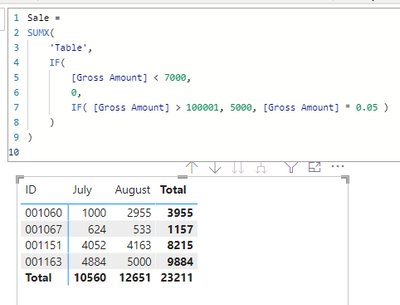
result:

vchenwuzmsft_0-1641522155616.png

Pbix in the end you can refer.

Best Regards

Community Support Team _ chenwu zhu


If this post helps, then please consider Accept it as the solution to help the other members find it more quickly.

View solution in original post

5 REPLIES 5
gauravnarchal
Post Prodigy
Post Prodigy

@v-chenwuz-msft  - I need your further help on this.


I want to add another condition to this measure where

  • SUMX Table
  • if the Invoice date is equal to or less than 2 July 21 
    • If Gross Amount < 7000 return 0 or  Gross Amount > 100001 return 5000 else Gross Amount *0.05
  • if the Invoice date is equal to or greator than 1 August 21 
    • If Gross Amount < 7000, gross amount * 0.03, if Gross Amount > 100001 return 5000 else Gross Amount *0.75
v-chenwuz-msft
Community Support
Community Support

Hi @gauravnarchal ,


There are some errors in your code that are causing power bi to not recognize the filters you want correctly.

Maybe you can try this code:

Sale =
SUMX(
    'Table',
    IF(
        [Gross Amount] < 7000,
        0,
        IF( [Gross Amount] > 100001, 5000, [Gross Amount] * 0.05 )
    )
)

result:

vchenwuzmsft_0-1641522155616.png

Pbix in the end you can refer.

Best Regards

Community Support Team _ chenwu zhu


If this post helps, then please consider Accept it as the solution to help the other members find it more quickly.

amitchandak
Super User
Super User

@gauravnarchal , Try this

Sale = Sumx(Summarize(Table, Table[ID], "_1" , Switch(True() ,[Gross Amount]<7000,0, [Gross Amount]>100001,5000,([Gross Amount]*.05))), [_1])


Add agent and month if needed to summarize


If this does not help
Can you share sample data and sample output in table format? Or a sample pbix after removing sensitive data.

Share with Power BI Enthusiasts: Full Power BI Video (20 Hours) YouTube
Microsoft Fabric Series 60+ Videos YouTube
Microsoft Fabric Hindi End to End YouTube

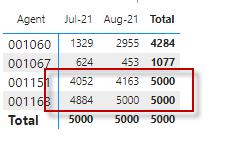
@amitchandak  - Still the row total is not correct. 


gauravnarchal_0-1641285798864.png


@gauravnarchal , If this does not help
Can you share sample data and sample output in table format? Or a sample pbix after removing sensitive data.


Sale = Sumx(Summarize(Table, Table[agent], Table[Month Year], "_1" , Switch(True() ,[Gross Amount]<7000,0, [Gross Amount]>100001,5000,([Gross Amount]*.05))), [_1])

Share with Power BI Enthusiasts: Full Power BI Video (20 Hours) YouTube
Microsoft Fabric Series 60+ Videos YouTube
Microsoft Fabric Hindi End to End YouTube

Helpful resources

Announcements
Fabric Data Days is here Carousel

Fabric Data Days 2026

Don't miss out on Data Days, June 15 through August 7. Learn Fabric, Power BI, SQL, AI and more.

May Power BI Update Carousel

Power BI Monthly Update - May 2026

Check out the May 2026 Power BI update to learn about new features.

Power BI DataViz World Championships carousel

Power BI DataViz World Championships - June 2026

A new Power BI DataViz World Championship is coming this June! Don't miss out on submitting your entry.