cancel
Showing results for 
Search instead for 
Did you mean: 

Learn from the best! Meet the four finalists headed to the FINALS of the Power BI Dataviz World Championships! Register now

Reply
Anonymous
Not applicable

Isblank function and concatenate in Direct Query

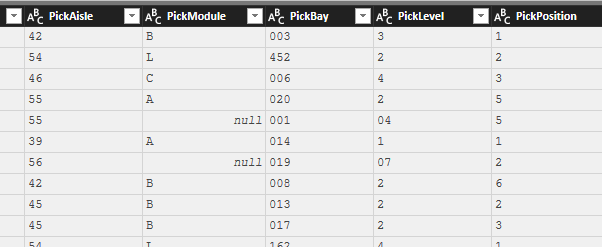
I wanna create a column "Bay & Level" using PickAisle, PickModule, PickBay & PickLevel.

Eg: 42B-003-3. If the value is NULL, I want it to be blank. 

Mode: Direct Query

I am getting the values correctly except for NULL values. Could someone help me?

BayLevel.PNG

1 ACCEPTED SOLUTION
MFelix
Super User
Super User

Hi @Anonymous,


try the following formula:


[PickAisle] & "-" &(if [PickModule] = null then " " else [PickModule]) & "-" & [PickBay] & "-" & [PickLevel]

Regards,

MFelix


Regards

Miguel Félix


Did I answer your question? Mark my post as a solution!

Proud to be a Super User!

Check out my blog: Power BI em Português


View solution in original post

4 REPLIES 4
Anonymous
Not applicable

Not sure if your expectation is the following result. If it is, you can try use Power Query Column from Examples feature to do it.


Go to Query Editor->Column from Examples->From All Columns, fill in the merged results in the first value, then Power BI will create the following values accordingly.

2018-04-18_9-00-32.png


MFelix
Super User
Super User

Hi @Anonymous,


try the following formula:


[PickAisle] & "-" &(if [PickModule] = null then " " else [PickModule]) & "-" & [PickBay] & "-" & [PickLevel]

Regards,

MFelix


Regards

Miguel Félix


Did I answer your question? Mark my post as a solution!

Proud to be a Super User!

Check out my blog: Power BI em Português


Hi, can I see the whole formula for this please?


Hi @workonpower ,


Not sure if this is what you are refering to but:


[PickAisle] & "-" & (
  if [PickModule] = null then " "
  else [PickModule]) & "-" & [PickBay] & "-" & [PickLevel]


This formula is for M language used in the query editor.


Regards,

MFelix 


Regards

Miguel Félix


Did I answer your question? Mark my post as a solution!

Proud to be a Super User!

Check out my blog: Power BI em Português


Helpful resources

Announcements
Power BI DataViz World Championships carousel

Power BI DataViz World Championships - June 2026

A new Power BI DataViz World Championship is coming this June! Don't miss out on submitting your entry.

Join our Fabric User Panel

Join our Fabric User Panel

Share feedback directly with Fabric product managers, participate in targeted research studies and influence the Fabric roadmap.

March Power BI Update Carousel

Power BI Community Update - March 2026

Check out the March 2026 Power BI update to learn about new features.