cancel
Showing results for 
Search instead for 
Did you mean: 

July 7 - July 17 | Round 2 of the Power BI Dataviz World Championships. Don't miss your chance! Learn more

Reply
murphm6
Helper II
Helper II

IsInScope() and Matrix Visual Question

Hey all,


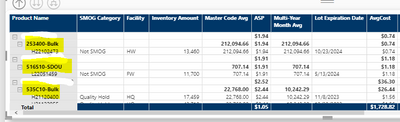
Is there a way to use ISINSCOPE() to show a value in a matrix function for only the middle level of the hierarchy? In my case, I want only want the ASP and Multi-YearMonthAvg columns to only show at the highlighted level and not below. There is a level of hierarchy above the highlighted which I've hidden for anonymity, but I don't want the value to appear there either. 


murphm6_0-1669843203753.png


Can anyone help?

1 ACCEPTED SOLUTION
Anonymous
Not applicable

Hi @murphm6 ,

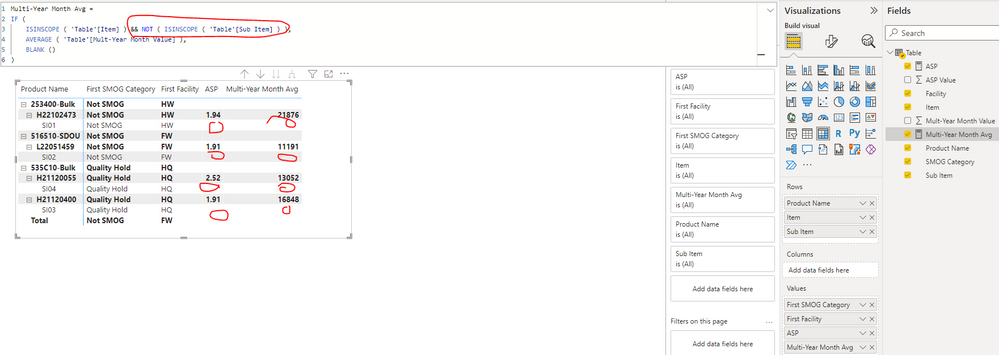
Please update the formula of measure [] and [] as below,  you can find the details in the attachment.

ASP =
IF (
    ISINSCOPE ( 'Table'[Item] ) && NOT ( ISINSCOPE ( 'Table'[Sub Item] ) ),
    SUM ( 'Table'[ASP Value] ),
    BLANK ()
)
Multi-Year Month Avg =
IF (
    ISINSCOPE ( 'Table'[Item] ) && NOT ( ISINSCOPE ( 'Table'[Sub Item] ) ),
    AVERAGE ( 'Table'[Mult-Year Month Value] ),
    BLANK ()
)

yingyinr_0-1669944445184.png

Best Regards

View solution in original post

3 REPLIES 3
Anonymous
Not applicable

Hi @murphm6 ,

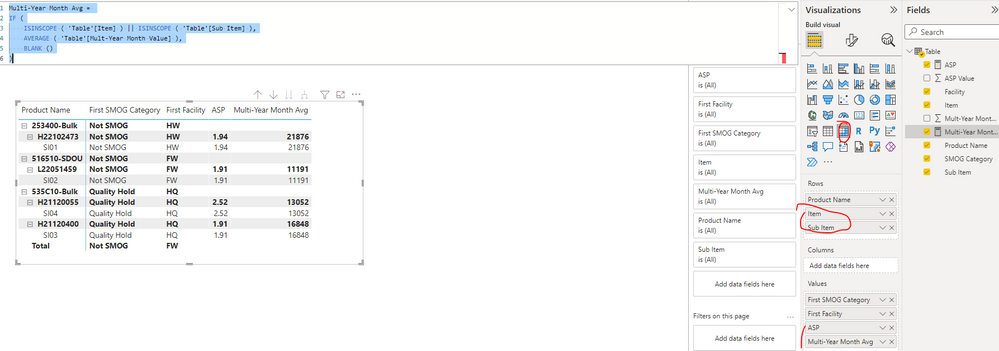
As checked your screenshot, it seems that there are 3 levels under the Rows fields, you can create the measures as below to get the desired result. Then out these new measures onto the matrix visual to replace the original fields... Please find the details in the attachment.

ASP = 
IF (
    (ISINSCOPE ( 'Table'[Item] ) || ISINSCOPE ( 'Table'[Sub Item] )),
    SUM ( 'Table'[ASP Value] ),
    BLANK ()
)
Multi-Year Month Avg = 
IF (
    ISINSCOPE ( 'Table'[Item] ) || ISINSCOPE ( 'Table'[Sub Item] ),
    AVERAGE ( 'Table'[Mult-Year Month Value] ),
    BLANK ()
)

yingyinr_0-1669864386847.png

Best Regards

Hi @Anonymous


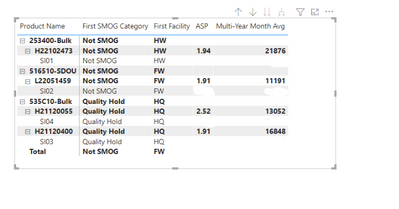
Thank you for the response. It appears to almost be correct. I only want the values for ASP and multi-year avg to appear for the second value (item as you have it) and not the sub-item. Is this possible?


Desired results look like this: 

murphm6_0-1669910903463.png


Anonymous
Not applicable

Hi @murphm6 ,

Please update the formula of measure [] and [] as below,  you can find the details in the attachment.

ASP =
IF (
    ISINSCOPE ( 'Table'[Item] ) && NOT ( ISINSCOPE ( 'Table'[Sub Item] ) ),
    SUM ( 'Table'[ASP Value] ),
    BLANK ()
)
Multi-Year Month Avg =
IF (
    ISINSCOPE ( 'Table'[Item] ) && NOT ( ISINSCOPE ( 'Table'[Sub Item] ) ),
    AVERAGE ( 'Table'[Mult-Year Month Value] ),
    BLANK ()
)

yingyinr_0-1669944445184.png

Best Regards

Helpful resources

Announcements
FabCon and SQLCon Barcelona 2026

FabCon & SQLCon – Barcelona 2026

Join us in Barcelona for FabCon and SQLCon, the Fabric, Power BI, SQL, and AI community event. Save €200 with code FABCMTY200.

60 days of Data Days Carousel

Data Days 2026

Join Fabric Data Days 2026: 60 days of free live/on-demand sessions, challenges, study groups, and certification opportunities.

Power BI DataViz World Championships carousel

Power BI DataViz World Championships - June 2026

A new Power BI DataViz World Championship is coming this June! Don't miss out on submitting your entry.