Join us at FabCon Atlanta from March 16 - 20, 2026, for the ultimate Fabric, Power BI, AI and SQL community-led event. Save $200 with code FABCOMM.
Register now!The Power BI Data Visualization World Championships is back! Get ahead of the game and start preparing now! Learn more
I have mailing addresses within a file and I'm trying to check the postal codes to ensure they follow the right format of A#A #A#. With Excel, I'd use the MID formula to return the specific character and manually review. Is there a Power Query function to check the format of postal codes and ensure they follow the guidelines of A#A #A#?
Thank you in advance! I've tried searching for this but couldn't find any solutions.
Solved! Go to Solution.
Hi, @Anonymous
In powerbi, I would suggest you create a calculated column or measure.
You can use the MID function to return the specific character and manually review.
Please check this official document.
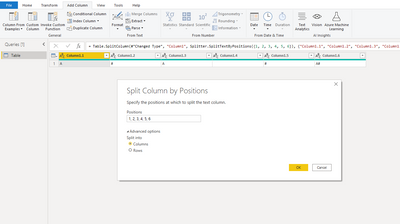
You can also try "split" feature in query editor as below:
Best Regards,
Community Support Team _ Eason
Hi, @Anonymous
In powerbi, I would suggest you create a calculated column or measure.
You can use the MID function to return the specific character and manually review.
Please check this official document.
You can also try "split" feature in query editor as below:
Best Regards,
Community Support Team _ Eason
Thanks for this! Going to try it out and hopefully can get it to work.
@Anonymous , You can create a string with the format and compare, but not sure that can help https://docs.microsoft.com/en-us/powerquery-m/text-format
Text.Start Text.Middle and Text.End are good to use
The Power BI Data Visualization World Championships is back! Get ahead of the game and start preparing now!
| User | Count |
|---|---|
| 41 | |
| 38 | |
| 36 | |
| 31 | |
| 28 |
| User | Count |
|---|---|
| 129 | |
| 88 | |
| 79 | |
| 68 | |
| 63 |