Join us at FabCon Atlanta from March 16 - 20, 2026, for the ultimate Fabric, Power BI, AI and SQL community-led event. Save $200 with code FABCOMM.
Register now!Get Fabric Certified for FREE during Fabric Data Days. Don't miss your chance! Request now
Goodnight everyone,
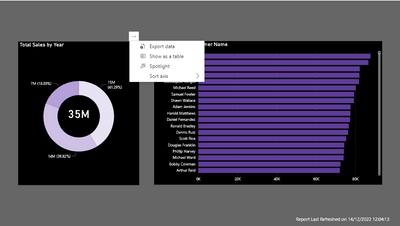
Is it possible to disable the Spotlight option under More Options under Header Icons?
Regards
Solved! Go to Solution.
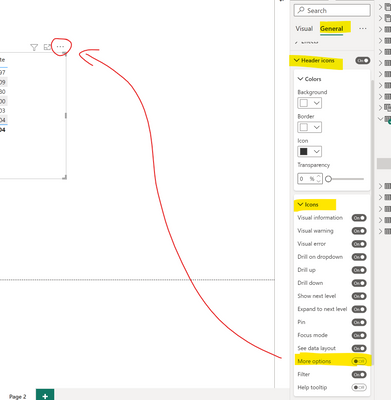
not that I am aware of. Only if it is fine for also to hide the other options behind the 3 dots. When you hide the "more option" icon then it should not appear in the POwer BI service.
maybe not quite what you need but maybe it helps.
Best regards
Michael
-----------------------------------------------------
If this post helps, then please consider Accept it as the solution to help the other members find it more quickly.
Appreciate your thumbs up!
@ me in replies or I'll lose your thread.
Hi @Mikelytics ,
Thank you very much for your answer. The idea is to keep the options that are currently shown in More Options minus the Spotlight one.
Regards,
was also my understanding. Only wanted to provide the option if my understanding was wrong. 🙂
Best regards
Michael
not that I am aware of. Only if it is fine for also to hide the other options behind the 3 dots. When you hide the "more option" icon then it should not appear in the POwer BI service.
maybe not quite what you need but maybe it helps.
Best regards
Michael
-----------------------------------------------------
If this post helps, then please consider Accept it as the solution to help the other members find it more quickly.
Appreciate your thumbs up!
@ me in replies or I'll lose your thread.
Check out the November 2025 Power BI update to learn about new features.
Advance your Data & AI career with 50 days of live learning, contests, hands-on challenges, study groups & certifications and more!