Join us at FabCon Atlanta from March 16 - 20, 2026, for the ultimate Fabric, Power BI, AI and SQL community-led event. Save $200 with code FABCOMM.
Register now!The Power BI Data Visualization World Championships is back! Get ahead of the game and start preparing now! Learn more
Good afternoon,
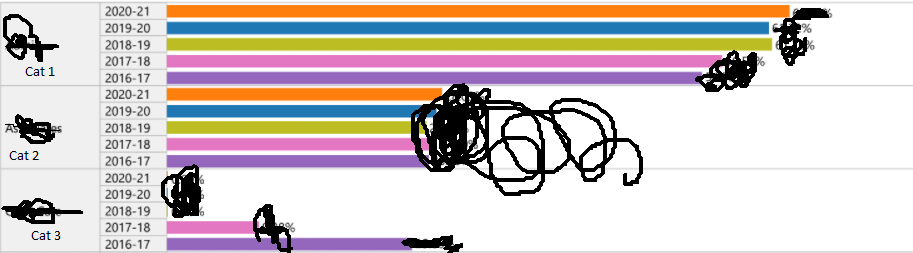
Tableau chart
Can you please guide me if there's a way to re-create this chart in Power BI? Combining table and chart?
Thank you
Solved! Go to Solution.
Hi @wildmight2017 ,
Not as like as two peas. As far as I know, there are two workarounds:
1.You may want to try this free visual: https://appsource.microsoft.com/en-us/product/power-bi-visuals/WA200000675?tab=Overview
2.Using data bar in the matrix visual:https://www.tutorialgateway.org/add-data-bars-to-table-in-power-bi/
Best Regards,
Liang
If this post helps, then please consider Accept it as the solution to help the other members find it more quickly.
Hi @wildmight2017 ,
Not as like as two peas. As far as I know, there are two workarounds:
1.You may want to try this free visual: https://appsource.microsoft.com/en-us/product/power-bi-visuals/WA200000675?tab=Overview
2.Using data bar in the matrix visual:https://www.tutorialgateway.org/add-data-bars-to-table-in-power-bi/
Best Regards,
Liang
If this post helps, then please consider Accept it as the solution to help the other members find it more quickly.
@wildmight2017 you can add data bar to values and select show only data bars and you can get a similar look. Conditional table formatting in Power BI Desktop - Power BI | Microsoft Docs
✨ Follow us on LinkedIn
Check my latest blog post The Power of Using Calculation Groups with Inactive Relationships (Part 1) (perytus.com) I would ❤ Kudos if my solution helped. 👉 If you can spend time posting the question, you can also make efforts to give Kudos to whoever helped to solve your problem. It is a token of appreciation!
⚡ Visit us at https://perytus.com, your one-stop-shop for Power BI-related projects/training/consultancy.⚡
Subscribe to the @PowerBIHowTo YT channel for an upcoming video on List and Record functions in Power Query!!
Learn Power BI and Fabric - subscribe to our YT channel - Click here: @PowerBIHowTo
If my solution proved useful, I'd be delighted to receive Kudos. When you put effort into asking a question, it's equally thoughtful to acknowledge and give Kudos to the individual who helped you solve the problem. It's a small gesture that shows appreciation and encouragement! ❤
Did I answer your question? Mark my post as a solution. Proud to be a Super User! Appreciate your Kudos 🙂
Feel free to email me with any of your BI needs.

Check out the November 2025 Power BI update to learn about new features.
Advance your Data & AI career with 50 days of live learning, contests, hands-on challenges, study groups & certifications and more!
| User | Count |
|---|---|
| 58 | |
| 45 | |
| 42 | |
| 20 | |
| 18 |