This time we’re going bigger than ever. Fabric, Power BI, SQL, AI and more. We're covering it all. You won't want to miss it.
Learn moreLevel up your Power BI skills this month - build one visual each week and tell better stories with data! Get started
Hello everyone,
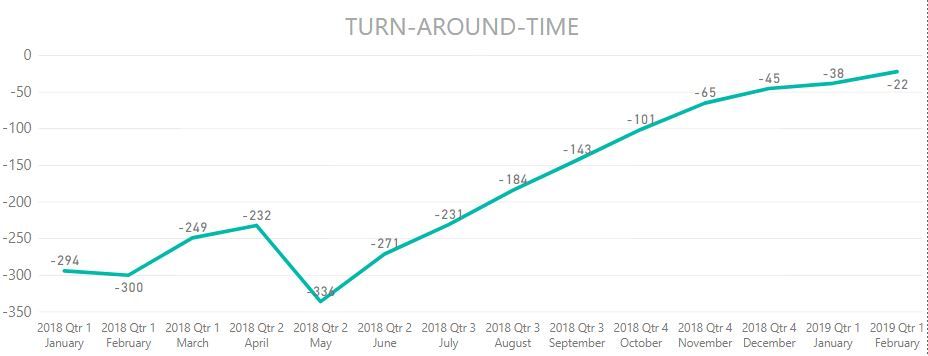
Is there a way to reverse the chart below so the line is trending downward? Here is the link to the pbi file.
Can anyone please advise if it is possible to reverse the trend line? Thanks a lot!!!
@trdoan ,
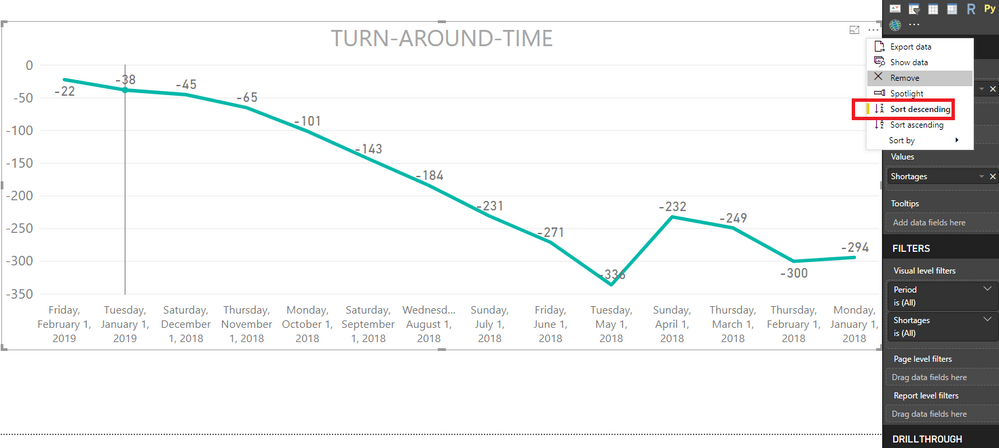
Click the ellipse on the right-top hand of line chart, then click "sort descending".
Community Support Team _ Jimmy Tao
If this post helps, then please consider Accept it as the solution to help the other members find it more quickly.
Hi @v-yuta-msft , thanks for your advice but it isn't quite what I was expecting.
It does trend downward, however, the start month is February 2019 and goes backward to 2018, which is a bit confusing for anyone trying to mull over how this chart works.
I don't know if this piece of information is important but this Turn-around-time chart has this sort of logic: my firm considers an increase in TAT a bad impact on the business and from the chart you can see all numbers are negative and starting from May 2018, it keeps increasing (negative numbers getting closer to 0), which is obviously not a good trend, bad at the very least.
Is there a DAX expression that is able to ignore the negative sign during the computation (which I think is easier to set the chart to trend downward) but still can show the negative sign in the chart?
Apologise if all of this logic confuses you. Let me know if this is possible and if you have any suggestion how to go about this. Thanks a lot!!!
Check out the April 2026 Power BI update to learn about new features.
Sign up to receive a private message when registration opens and key events begin.
If you have recently started exploring Fabric, we'd love to hear how it's going. Your feedback can help with product improvements.
| User | Count |
|---|---|
| 35 | |
| 28 | |
| 28 | |
| 21 | |
| 18 |
| User | Count |
|---|---|
| 68 | |
| 39 | |
| 33 | |
| 24 | |
| 23 |